

Table of Contents
Finding a good recipe is easy. Knowing how to save recipe links on your phone so you can actually find them again – that is the hard part. You liked the post, closed the app, and two weeks later it is gone.
This happens constantly. Recipe content floods every platform: short videos on TikTok, long posts on food blogs, reels on Instagram, pinned links on Pinterest. The problem is not that there are too few good recipes. The problem is that “saving” them in the wrong place makes them disappear.
If you cook regularly and rely on your phone for inspiration, you need a real system to save recipe links on your phone – one that works across apps and actually lets you find things again.
The issue is not your memory. It is the way we save things.
The best way to save recipe links on your phone is to use one dedicated app for everything – regardless of where you found the recipe. Save it there, drop it in a folder, give it a short name. That three-second habit is what turns a growing pile of lost links into a collection you can actually cook from.
Why Recipe Links Keep Getting Lost
You save in five different places
What Is a Recipe Link Manager?
A recipe link manager is a dedicated app or tool where you save, name, and organize recipe links from any source – Instagram, TikTok, food blogs, YouTube – all in one searchable place you own and control.
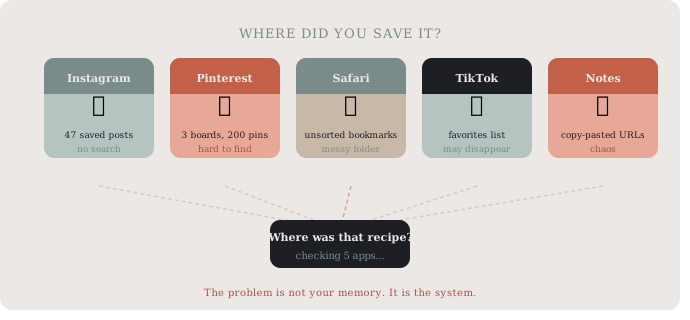
A recipe link saved to Instagram is in Instagram. A link saved to Pinterest is in Pinterest. A link bookmarked in Safari is in Safari. None of these talk to each other. When you are standing in the kitchen trying to remember where you saw that lemon chicken, you are checking four apps before giving up.
Most people have a mental note system that doubles as their recipe archive. It does not scale.
Platform saves disappear
Instagram saves are tied to the platform. If a creator deletes a post – or you lose access to your account – those saved posts are gone. The same goes for TikTok favorites. You never actually own those links. You are just borrowing a reference to them.
This is the core problem with saving recipes inside social apps: you are saving the reference, not the content. And references can break. The safest way to save recipe links on your phone is in an app you actually own – not inside a social platform.
You can never find them when you need them
Even if you saved the link correctly, finding it at the right moment is another problem. Most apps sort by when you saved something, not by category, cuisine, or occasion. Searching for “Thai soup” in your Safari bookmarks returns nothing useful.
The recipe graveyard is full of good intentions.
How to Save Recipe Links on Your Phone Properly
Use one place, not many
The single most impactful change you can make is to pick one place for all recipe links – regardless of where you found them. Whether it came from a YouTube video, a food blog, or an Instagram reel, it should all land in the same app.
This sounds simple. But it requires a tool that accepts links from any source, not one that is tied to a single platform.
Organize by category from the start
When you save a recipe link, take five seconds to put it somewhere specific. Not into a general “Recipes” folder, but into something like “Weeknight dinners,” “Baking,” or “Summer grilling.” The extra step feels small and saves real time later. Every time you save recipe links on your phone, the five-second folder decision is what separates a useful archive from a pile of links.
The goal is to be able to open your phone while grocery shopping and immediately find what you are looking for – not to scroll through 300 unsorted bookmarks hoping something jogs your memory.
Name or tag the link before you forget
Most recipe apps and bookmark tools let you rename links. Use this. Instead of saving a link titled “Ottolenghi.com – Recipes,” rename it to “Roasted eggplant with tahini – Ottolenghi.” Future you will be grateful.
A short, descriptive title makes the difference between a recipe archive that actually works and one that is just a pile of URLs.
Unlike saving recipes directly inside Instagram or Pinterest – where you never truly own the link – a dedicated bookmark app keeps your recipe collection safe, searchable, and accessible even if you delete the original platform account.
The Part Most People Skip: Reviewing What You Saved
A good collection of saved recipe links on your phone only works if you actually revisit it. Once a week or before you plan meals, spend a few minutes going through recent saves. Delete the ones that do not look as good as you remembered. Move things into the right folders. Flag a few for “this week.”
This habit keeps the collection useful instead of overwhelming. According to research on habit formation and behavior design, small weekly review rituals are far more effective than large one-time organizing sessions. James Clear on habit systems is a good starting point if you want to build this kind of routine.
Building a Recipe Save Habit That Sticks
The goal is simple: save recipe links on your phone once, in the right place, and find them again on a weeknight without the scavenger hunt.
Keep it simple: one app, clear folders, renamed links. Review briefly once a week. That is the whole system.
If you are also thinking about how to organize everything you save – not just recipes – the same approach applies across all link types. We cover the full picture in 5 simple ways to save links while browsing on your phone.
A Tool Worth Trying

If you are looking for a clean, simple way to save recipe links on your phone across platforms, SocialMarks is worth a look. It is a bookmark manager built for exactly this use case – save links from any app, organize them into folders, and find them again when you need them.
No ads, no algorithm, no “suggested content.” Just your links, organized the way you want them.
Download SocialMarks on the App Store
Android version coming soon.
Published by Buket
Buket is one half of the two-person team behind Digital Traffic Labs. She makes apps look good while a toddler nap is the only deadline that matters. And yes, it’s non-negotiable.