
You’re scrolling through your feed and someone shares a documentary trailer, a tutorial you’ve been meaning to watch, or a recipe video you definitely want to try this weekend. You tap the bookmark icon, or maybe you just text the link to yourself, and move on.
Three days later, it’s gone. Not deleted, just lost somewhere in the pile. The problem isn’t finding good stuff, and it isn’t motivation. You genuinely meant to come back. The issue is the system, or the lack of one.
Quick answer: The best way to save links to watch later is to send every video and article to one dedicated place instead of each app’s own save button, then sort them into four or five simple categories such as watch and read. A short weekly review keeps the list small enough to use, so the link you saved on a Tuesday is easy to find on a Saturday.
What is a watch-later system?
A watch-later system is a single, organized place where you save links to revisit later, separate from browser bookmarks, social media saves, and open tabs. The goal is one searchable collection you can actually use.
Why do most watch-later lists stop working?
You’re saving in too many places
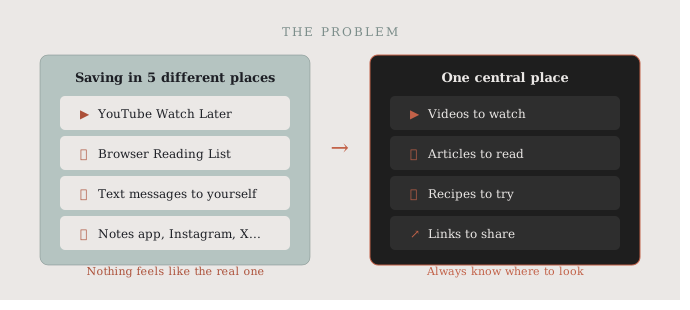
The browser has a Reading List. YouTube has a Watch Later playlist. Instagram lets you save posts. X has bookmarks. Your notes app has a running list of URLs. And somewhere in your texts is a conversation with yourself from six months ago.
| Where you save | What it holds | The catch |
|---|---|---|
| YouTube Watch Later | YouTube videos | Nothing from other apps |
| Instagram or TikTok saves | Posts from that app | Stays inside that app |
| Browser Reading List or bookmarks | Pages from that browser | Misses links from social apps |
| Texts or notes to yourself | Anything you paste | Hard to search and sort |
| One dedicated link app | Links from every app | Takes one extra tap to send there |
When every app has its own saving system, nothing feels like the real one. So you pick whichever is most convenient in the moment, and what you save ends up in five different places. That’s not a watch-later list. That’s a search party waiting to happen, and it’s why people end up re-finding content through search instead of their own saves.
The list grows but never shrinks
The second problem is that most watch-later lists are write-only. You add things, rarely delete them, and over time the list becomes so long it stops feeling useful.
When you sit down to actually watch something, you’re faced with 200 unsorted links going back two years. At that point it’s easier to just open YouTube and start fresh. A good system needs to feel manageable, not like a drawer you’re afraid to open.
You can’t find what you actually want
Even if you remember saving something, finding it again is its own challenge. “It was a video about productivity, or maybe it was design? I saved it last month, I think.” Without categories or labels, memory is the only search function you have. And memory is terrible at this.
How do you save links to watch later the simple way?
One place, not five
The single biggest improvement you can make is committing to one central place for saved links. Not one per category, not one per device: just one place where everything goes.
This means being intentional when you encounter something worth saving. Instead of hitting the native save button in whatever app you’re in, you take one extra step and send it to your central system through the share button. It feels like friction at first. Within a week it becomes the habit, and suddenly you know exactly where to look. Our guide on how to save links while browsing on your phone walks through that share-first habit, and how to save Instagram links easily covers Reels and posts.
Use simple categories that match how you think
Once everything is in one place, a light organizational system makes a real difference. The key word is light. You don’t need a perfect taxonomy, just a few labels that match how you browse.
For most people that looks something like: videos to watch, articles to read, recipes to try, links to share. Four or five categories, not twenty. When you’re deciding where to put something, the choice should take less than five seconds. If it takes longer, your categories are too complicated.
Unlike YouTube’s built-in Watch Later queue or browser bookmarks, a dedicated link app lets you save links from any app, not just one platform, and organize them the way you actually think. If you’re comparing tools that do this, see our roundup of read later alternatives for saving links.
Schedule a weekly review
The final piece is a short, regular habit of going through what you saved. Sunday evening, Friday afternoon, whenever makes sense: just 10 to 15 minutes to look through your saved links from the week.
Some you’ll watch. Some you’ll realize you don’t care about anymore, so delete them. Some you’ll move to a different category. The point is that the list stays useful and alive, not just a growing archive of good intentions.
Should you save videos and articles differently?
It’s worth treating video links slightly differently than written content. Videos take more time and usually need a specific mood or setting: sitting down, headphones, 30 free minutes. Articles can be read in fragments.
Consider using separate categories for video content, even something as simple as “watch” vs. “read,” so you’re not scanning a mixed list when you have exactly 20 minutes and want to watch something. This small distinction makes your list more actionable when you actually sit down to use it.
How do you build the habit of saving links to watch later?
Saving links consistently only works if the friction is low enough that you’ll do it every time. That means your tool of choice needs to be on the phone you browse with, fast to open, and easy to add to.
If saving something takes more than a few taps, you’ll skip it when you’re tired or in a hurry, which is most of the time. The best systems disappear into the background; you barely notice you’re using them.
Once you have a central place for your watch-later links, it’s worth thinking about how you organize everything else too. The same principles apply: one app, simple categories, regular review. We cover the broader picture in 5 simple ways to organize bookmarks on your phone.
How SocialMarks helps
If you want one place for everything you mean to watch or read later, SocialMarks is the iPhone app we built for it. It saves posts and links from YouTube, TikTok, Instagram and the web through the share sheet, and reads them for you (only after you agree), using the caption, the audio and the video frames. A saved video becomes the right type: a recipe, a how-to, a workout, or a movie or show. It’s free to use, with no ads and no account needed.
- Collections like Watch and Read, plus one search across everything.
- Saved recipe videos turn into ingredients and steps you can cook from.
- A dead link check flags videos that were taken down.
Download SocialMarks from the App Store and save your next video to it.
Frequently asked questions
How do I save links to watch later?
Tap the share button on the video or article and send it to one dedicated place instead of each app’s own save button. Sort it into a simple category like watch or read so it is easy to find later.
Is YouTube Watch Later enough?
It works for YouTube videos only. If you also save videos and articles from Instagram, TikTok or the web, one central list keeps everything in the same place.
How do I keep my watch-later list from getting too long?
Spend 10 to 15 minutes once a week going through it. Watch a few, delete what no longer interests you, and move the rest into the right category.
Can SocialMarks save TikTok and YouTube videos?
Yes. SocialMarks saves links to TikTok, YouTube and Instagram posts through the iOS share sheet and can read them to sort each save by type. It is available for iPhone and iPad.
Should I save videos and articles in separate lists?
Yes, a simple watch and read split helps, because videos usually need a block of free time while articles can be read in fragments. When you have 20 minutes to watch something, you only scan the video list.
What happens if a video I saved gets deleted?
If the creator removes a video, the saved link stops working and the video is usually gone from that platform. A short note about what the video covered helps you search for it again, and a weekly review clears out dead links.