
You’re scrolling through your phone. An article catches your eye, a recipe looks perfect, a product you’ve been searching for finally shows up. You tell yourself you’ll come back to it later. You don’t. The link is gone, buried under everything else.
This happens constantly on mobile. The browser is not built for saving things; it’s built for visiting things. On a laptop you might have a system of bookmarks, tabs and notes. On your phone, most people wing it. The problem isn’t that you forget. It’s that you don’t have a quick, reliable place to send links when you find them.
Quick answer: To save links while browsing on your phone, tap Share the moment you find something, send it to one app you always use, drop it into one of a few broad collections, and add a three-to-five-word label. A five-minute cleanup once a week keeps the list short enough that you actually come back to it.
Why do most people lose links they find while browsing?
You’re scrolling fast and saving slowly
Mobile browsing is fast. You move from app to app, feed to feed, and links appear and disappear in seconds. The friction of saving (opening a new app, copying a URL, pasting it somewhere) is just enough to make you skip it. You only save links while browsing when the process feels effortless.
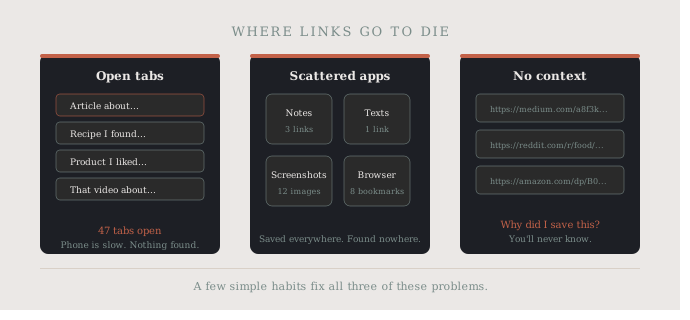
Most people default to the easiest option: leaving the tab open. But tabs pile up, and eventually you close everything and lose it all. Open tabs are not a bookmark system; they’re a to-do list you’re afraid to look at. We dig into that problem in a mobile link saver for fewer forgotten tabs.
No single place to send things
Part of the problem is scattered destinations. A link goes to Notes. Another gets texted to yourself. One gets screenshotted. Another ends up in a chat with a friend “for later.” With no consistent home for them, you’ll rarely find anything again.
This scattered approach also means you spend more time looking for things than using them. A recipe you saved three weeks ago? You’ll search Notes, then texts, then your camera roll before giving up.
The context gets lost
Even when you do save a link, the context disappears. Why did you save it? What were you going to do with it? A plain URL with no label tells you nothing. Without any organization, your saved links become a pile instead of a collection.
What are 5 simple ways to save links while browsing on your phone?
Each habit answers one of the problems above:
| Problem | Habit that fixes it |
|---|---|
| Scrolling fast, saving slowly | Tap Share the moment you see it |
| One long list, nothing findable | Five or six broad collections |
| Context gets lost | A three-to-five-word label |
| Links pile up | A weekly five-minute cleanup |
| No single place to send things | One app, every time |
1. Use your browser’s share sheet immediately
Every mobile browser has a share button. The moment you see something worth keeping, tap it. Don’t wait until the end of your session, and don’t tell yourself you’ll come back. From the share sheet you can send the link to Notes, a link-saving app, or anywhere else in one tap. It takes less than five seconds, and that’s all the friction you can afford. On iPhone, Apple’s guide to sharing from apps shows where the button lives, and our post on ways to save links on iPhone compares the built-in options.
2. Create a small set of named collections
If everything goes into one list, nothing is findable. But with five or six named categories, such as Work, Reading, Recipes, Products, Inspiration and Watch Later, you can drop a link in the right place in seconds. You’re not just collecting; you’re organizing in real time.
Keep the categories broad. If you make them too specific, you’ll hesitate before saving, and that hesitation is where links get lost. Videos deserve their own bucket, which we explain in how to save links to watch later.
3. Add a short label right away
This is the habit that separates useful saved links from a graveyard of URLs. Add three to five words describing why you saved it. Not a full note, just enough context so future you understands instantly.
“Pasta recipe, no-boil method” is useful. A raw URL is not. Many apps let you rename or annotate right at the save step. Don’t skip it. If recipes are most of your saves, see the best way to save recipe links on your phone.
4. Do a weekly five-minute cleanup
Even with good habits, links accumulate. Once a week, spend five minutes going through what you’ve saved. Delete what you don’t need, move things to the right category if they landed in the wrong place, and actually visit a few you’ve been putting off. A clean, manageable list feels good to use; a cluttered one gets ignored.
5. Pick one app and stick with it
The biggest mistake is using five different places. Your brain needs to know exactly where things go. One app. One system. Every time. It doesn’t matter which app, as long as it’s always the same one. Consistency beats any feature set: a simple app you actually open is more valuable than a powerful one you avoid.
Quick recap: the five habits in order
- Tap Share the moment you see something worth keeping.
- Drop it into one of five or six broad collections.
- Add a three-to-five-word label about why you saved it.
- Spend five minutes a week deleting, moving and opening saves.
- Use the same app every single time.
What should you do with links after you save them?
Saving is only half the habit. The other half is actually using what you’ve collected. A lot of people save links and never revisit them, which makes the whole system feel pointless over time.
Build a small ritual around it. Sunday morning coffee, a ten-minute block at weekday lunch, whatever fits your routine. Open your saved links, act on a few, delete what’s no longer relevant. This closes the loop and makes saving feel worthwhile. When you’re ready to tidy the bigger picture, our guide to organizing bookmarks on your phone picks up from here.
What mindset shift makes link saving work?
Most people think of link saving as a memory backup, something they do so they don’t forget. The better framing is curation. When you save links while browsing, you’re building a personal resource, not just a safety net.
That shift changes how you behave. You save with more intention. You label more consistently. You clean up more willingly. And a system you trust is a system you keep using; one you don’t trust gets ignored.
How SocialMarks helps
If you want one dependable place to send links from your phone, SocialMarks is the iPhone app we built for it. You save from any app through the iOS share sheet, and SocialMarks reads what you saved (only after you agree), so a recipe video, a restaurant post or a product page each lands as the right type. It’s free to use, with no ads and no account needed.
- Save a link, text, screenshot or photo in a couple of taps.
- Collections for your categories and one search across everything.
- Works with Instagram, TikTok, YouTube, Pinterest, Reddit and any web link.
Download SocialMarks on the App Store for iPhone and iPad.
Frequently asked questions
How do I save a link while browsing on my phone?
Tap the share button in your browser or app and send the link to the one app you use for saving. Doing it right away, before you scroll on, is what keeps links from getting lost.
Is leaving tabs open a good way to save links?
No. Open tabs are easy to close by accident, get reloaded, and pile up until you clear them all at once. They work for a page you need in the next hour, not for links you want to keep.
How should I label saved links?
Add three to five words about why you saved it, such as “pasta recipe, no-boil method.” A short reason is far easier to scan later than a raw URL or a long page title.
How often should I review my saved links?
A five-minute review once a week is enough for most people. Delete what you no longer need, fix links in the wrong category, and open a few you have been meaning to read or watch.
How do I save links across different browsers?
Browser bookmarks usually stay inside one browser, so links saved in Chrome do not show up in Safari. Sending links from any browser to one link-saving app through the share button keeps them all in one place.
What is the best way to save links?
The best way to save links is to send every link to one place the moment you find it, sort it into a few broad collections, and add a short label about why you saved it. A quick weekly review keeps the list useful.