
You open fifteen tabs for a research paper. Three days later, you can’t find any of them. Sound familiar?
It’s not just a student problem. It happens to researchers, lifelong learners, and anyone who spends time reading online. But for students juggling coursework, deadlines, and multiple subjects at once, it can feel especially chaotic. The default solution is usually “I’ll remember it” or “I’ll just bookmark it in Chrome.” Neither works the way you’d hope.
Quick answer: The simplest way for students to save research links is to send every source to one app, add a one-sentence note about why it matters, and file it by subject or project instead of by date. Saving the link the moment you find it, in the same place every time, is what makes sources easy to find when you sit down to write.
The real problem isn’t that you’re disorganized. It’s that the tools most people use for saving links weren’t designed for research. Your browser bookmarks folder becomes a black hole. Your “Read Later” apps turn into guilt lists. And your actual research gets scattered across tabs, apps, and devices.
Why do students struggle to save research links?
How the usual places compare for research:
| Where links go | Works for | Falls short |
|---|---|---|
| Open tabs | The page you are reading now | Lost on a crash, restart or accidental close |
| Browser bookmarks | A few sites you visit daily | Messy across subjects and devices; no context |
| Read-later apps | Casual article reading | Rarely organized by subject or project |
| One app with notes | Every source, by subject or project | Needs the same habit every time |
Too many tabs, no clear system
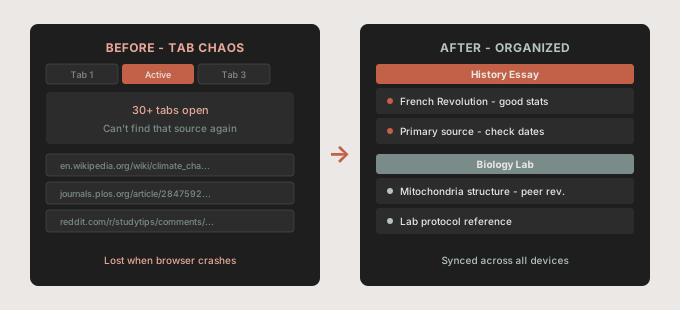
Opening tabs feels like organizing. It isn’t. A tab is just a temporary placeholder. It disappears when the browser crashes, when you close it by accident, or when you restart your laptop before a deadline.
Many students end up with 30 or more tabs open because closing a tab feels like losing the information inside it. But keeping everything open isn’t a system. It’s just postponing the problem. When you sit down to write, you can’t tell which tab had the source you needed, so you end up searching again for things you already found.
Browser bookmarks don’t scale
Browser bookmarks work fine for a handful of sites you visit daily. They break down fast when you’re trying to manage sources across five subjects, two semesters, and several devices.
The folder structure gets complicated quickly. You end up with a “Research” folder that contains everything from a recipe you liked to a PDF about mitochondria. Sync depends on using the same browser and account everywhere, and there’s no easy way to add context to remind yourself why you saved something.
Reading apps create another silo
Read-later apps are built for casual reading, not academic research. They save articles well, but they rarely let you organize by subject or project in a way that maps to how students think about their work. You end up with a saved articles list that’s just as chaotic as your bookmarks. If you’re weighing those tools anyway, our list of read later alternatives for saving links and our look at the best Pocket alternative for saving links compare the options.
How should students save research links so they can find them later?
Use one app for everything research-related
The first step is committing to a single place. Not bookmarks for some things, Notion for others, and a notes app for the rest. Pick one tool and use it consistently for every link you want to keep.
This matters more than which tool you choose. A simple, consistent habit beats a sophisticated system you don’t use. When you always save research links in the same place, finding them later becomes predictable.
Add context when you save
A URL alone tells you almost nothing three weeks later. When you save a source, a short note answers the questions you’ll have at writing time:
- Which assignment or chapter is it for?
- What does it give you: a statistic, a quote, a method, a counterargument?
- Is it a primary source you need to cite, or background reading?
“Good stats on climate migration, for Essay 2” is far more helpful than a bare link to an academic journal. It takes ten extra seconds and saves you ten minutes of re-reading later.
Organize by subject or project, not by date
Chronological lists are the worst way to store research. “Saved Tuesday” tells you nothing useful. Instead, organize your links by subject (History, Biology, Urban Studies) or by project (Essay 1, Lab Report, Thesis Chapter 2).
When your research is organized by topic rather than time, you can sit down to write and immediately find what you need. This is the difference between a collection and a system. For more ideas on naming and grouping, see how to organize saved links without clutter.
How do you keep research links consistent across devices?
One of the most frustrating parts of research is working across multiple devices. You find a great source on your phone, but when you sit down at your laptop to write, it’s gone, or it’s buried in a different app.
Decide where your sources live and stick with it. If you find most sources on your phone, save them there first, then copy the few you’ll actually cite into your reference manager or document when you start writing. If saving a link on one device and finding it on another takes more than two steps, you’ll stop doing it. Our guide to saving links while browsing on your phone covers the phone side of that habit.
This is also why browser bookmarks fall short. They sync in theory, but in practice the experience is inconsistent, especially if you use more than one browser.
How do you make saving sources a habit, not a chore?
The students who manage research well aren’t smarter. They just have a consistent habit. Every time you come across something useful, you save it immediately. Not “I’ll go back to that tab.” Not “I’ll remember the search terms.” Right now, in the right place.
Most of us overestimate how well we’ll remember where we found something, especially while juggling several assignments. A reliable external system isn’t a crutch. It’s just smart. And when a semester ends, move the sources worth keeping into a long-term folder; our guide on how to archive web links explains how.
The habit doesn’t have to be complicated. Open the app, save the link, add one tag. Done. Do it every time and it becomes automatic.
How SocialMarks helps
If you find a lot of your sources on your phone, SocialMarks is the iPhone and iPad app we built to save links from any app through the share sheet and keep them findable. It reads what you save (only after you agree) and adds tags based on what the page or post actually says, so a YouTube lecture, a Reddit thread and an article can sit in the same subject collection. It is free for students and everyone else, with no ads and no account required.
- A collection per subject or project, plus one search across everything.
- A dead link check that flags sources that no longer open.
- Optional SocialMarks Pro adds iCloud sync between your Apple devices and export.
SocialMarks is available on the App Store for iPhone and iPad.
Frequently asked questions
How do students keep track of research sources?
Save every source to one place the moment you find it, add a short note about why it matters, and file it by subject or project. A consistent habit matters more than the specific tool.
Should I organize research links by date or by topic?
By topic or project. A folder for each subject or assignment lets you open everything you need for one paper at once, while a list sorted by date tells you almost nothing.
Are browser bookmarks good for research?
They work for a few sites you visit every day, but they get messy across many subjects and devices. They also make it hard to note why you saved a source.
What should I write when I save a research link?
One sentence is enough: which assignment it is for and what it gives you, such as a statistic, a quote or a method. That note is what makes the link useful weeks later.
What is the best way to save websites for school?
Save each website to one app or folder as soon as you find it, file it under the class or assignment, and note what it gives you. If your class needs citations, also note the author, title and the date you accessed the page.
Should students use a reference manager?
A reference manager helps once you start citing sources in a paper, because it stores citation details and formats them for you. For collecting links while you browse, a simpler link app or folder is often faster, and you can move the sources you cite into the reference manager later.