
The question is rarely just, “When did the baby last eat?” Halfway through a feed, it can be, “Which side did I nurse on?” At daycare pickup, it might be, “Did they finish that bottle?” A baby feeding tracker app gives those small, easy-to-forget details one reliable place to live, so you can spend less energy reconstructing the day from memory.
For new parents, feeding can feel like a full-time loop. Feed, burp, clean up, settle, repeat. Tracking is not about turning your baby into a spreadsheet. It is about removing one more mental task when your hands are already full.
Quick answer: A baby feeding tracker app is a simple log for every bottle, nursing session and solid meal. It shows when your baby last ate, how much or which side, and what changed over the day, so caregivers can hand off without guessing. Keep entries short, log right after each feed, and use the history as context, not as a test your baby must pass.
This guide is general information, not medical advice. Every baby is different, so ask your pediatrician or health visitor about your own baby.
What should a baby feeding tracker app make easier?
The best tracking tool does not ask you to build a complicated system before you can use it. It should be fast enough to open with one hand, clear enough for a tired partner to understand, and focused enough that logging a feed takes seconds.
The real value appears between feeds. Instead of asking yourself whether it has been two hours or four, you can check. Instead of guessing how much your baby ate while you were out, you have a shared record. The information is simple, but the relief can be surprisingly big.
A good app should also make the latest entry obvious. When a baby is hungry and someone asks when they last ate, you should not need to scroll through menus or interpret a crowded dashboard. The answer should be right there.
Do feeding logs make parenting too rigid?
They should not. Babies do not follow schedules perfectly, and a tracker should not make you feel as if they should. Growth spurts, cluster feeding, illness, travel and ordinary unpredictable baby days can all change feeding patterns. The goal is not to force a routine. It is to notice what is happening.
A feeding log can help you see that your baby tends to take larger bottles in the morning, feeds more often in the evening, or is slowly stretching the time between meals. Those observations make planning a little easier. They also give useful context for conversations with a pediatrician or lactation consultant.
Still, numbers are only one piece of the picture. A baby who eats a different amount than usual is not automatically a problem. Wet diapers, alertness, growth, comfort and professional guidance matter too. The American Academy of Pediatrics has a clear overview of how often and how much babies eat, and your pediatrician can tell you what fits your baby. If you are worried about feeding, hydration, weight gain or a sudden change in behavior, contact your child’s healthcare provider rather than relying on an app alone.
How does a shared feeding log make handoffs easier?
Feeding information gets especially valuable when more than one person cares for a baby. Parents trade shifts. Grandparents help. A nanny or daycare provider may be part of the routine. Without a shared record, each handoff starts with a round of questions that can be hard to answer after a long day.
A simple log gives everyone the same starting point. One parent can see that the last bottle was at 1:15 p.m. and the other can pick up from there. If you want this to work across phones, our guide on whether parents can share feeding logs between caregivers walks through the options.
This is also helpful for pumping families. If one person feeds a bottle while another pumps or rests, recording what happened keeps the bigger picture clearer and cuts down on the back-and-forth that makes early parenthood feel chaotic.
What should you log for bottles, breastfeeding and solids?
It is tempting to track everything when you first bring a baby home. Feeding times, ounces, sides, sleep, diapers, medication, mood, pumping sessions and every new food can all sound useful. But too much tracking is often the reason people stop after a few days.
Start with the smallest useful setup. For many families, that is feeding time and amount. You can always add more later. The best routine is the one you can keep using during a messy kitchen cleanup, a contact nap, or a late-night feed when your phone is at 4 percent.
| Feeding type | Log every time | Optional extras |
|---|---|---|
| Bottle | Start time, amount your baby drank | Breast milk or formula, amount prepared |
| Breastfeeding | Start time, side | Duration, side you finished on |
| Solids | Food offered | Reactions worth remembering, new allergens |
Bottle feeding: track the facts that matter
For bottles, the most helpful record is often the simplest: when the feed started and how much your baby drank. If you prepare a larger bottle than your baby finishes, logging the amount consumed is more useful than the amount prepared. Our step-by-step guide on how to log bottle feedings covers the details.
You may also note formula, breast milk or a combination. Keep the data tied to a question you actually want answered, such as how much milk to send to daycare or whether a new feeding rhythm is forming.
Breastfeeding: use tracking as a memory aid
For nursing sessions, time and side can be enough. Some parents like to track duration. Others find that watching the clock adds stress and prefer a quick note only when they need it. Both approaches are valid.
If remembering the last side is your main challenge, a baby feeding tracker app can be a small but meaningful help. You do not have to hold that detail in your head while also trying to rest, eat and care for yourself.
Solids: make room for curiosity, not pressure
When solids begin, a basic food log can help you remember what your baby has tried and what they seemed to enjoy. It can be useful when introducing common allergens or when you want to share a clear history with a caregiver.
But first foods are often more about learning than eating. A few bites of avocado, a face covered in yogurt and a spoon tossed to the floor still count as a normal meal experience. The log is there to help you remember, not to judge whether every serving was a success.
How do you make the feeding log habit stick?
The easiest time to log a feed is immediately after it happens, before the next task takes over. If that is not realistic, log the basics when you get a quiet minute. A record that is mostly right is more helpful than a perfect system you abandon.
Give each caregiver a simple rule: whoever feeds the baby logs the feed. That prevents duplicate entries and removes the assumption that someone else will do it later. If one person is holding the baby, the other can take the quick logging job.
Use the history for practical decisions, not constant monitoring. Check it before leaving the house, during a handoff, or when your baby seems hungry earlier than usual. You do not need to review every chart every day. If you also log sleep and diapers, our guide to tracking feeding, sleep and diapers together shows how the three fit.
Why simple beats feature-heavy
Some parenting apps try to do everything: communities, articles, milestones, shopping lists, photo albums and layers of reports. Those extras can be useful for some families, but they can also make a basic task feel slower than it needs to be.
When choosing a tracker, look for a clean entry screen, an easy-to-read recent history and the feeding types your family uses. Shared access matters if several caregivers need updates. Privacy matters too, especially when an app stores information about your child.
What you do not need is a tool that makes you feel behind. A good app should feel like a helpful note on the fridge, not another standard to meet.
How FeedRight helps
FeedRight Baby Tracker is our baby tracker app for iPhone, Apple Watch and Android. It logs every bottle, nursing session and solid meal in one tap and tells you how long it has been since the baby last ate. Core logging is free, needs no account and works offline.
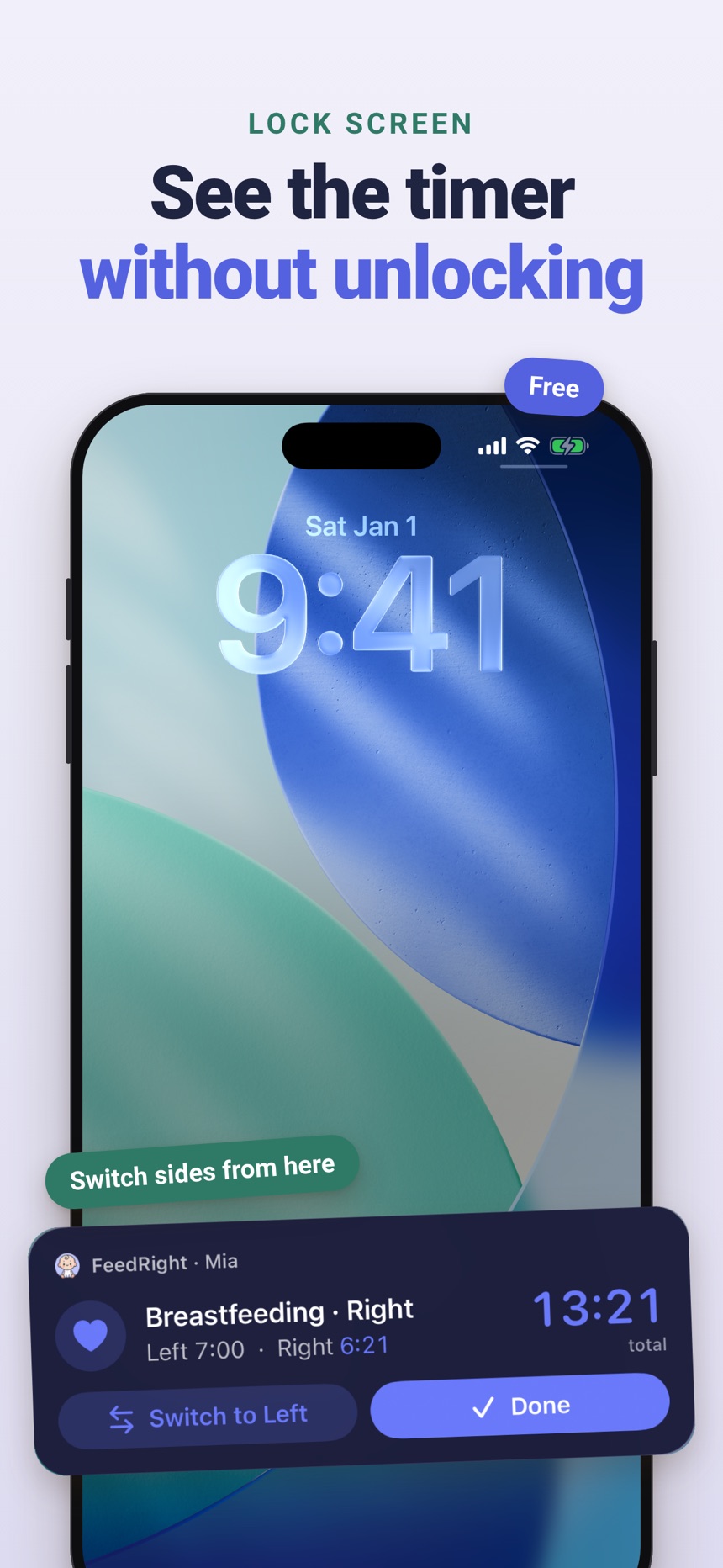
- A breastfeeding timer for left and right that remembers the side you finished on.
- Bottle logs in ml or fl oz, plus pumping and solids.
- Optional FeedRight Premium adds cloud backup and family sync, so both phones show the same log.
FeedRight is not a medical device. It is a memory aid. You can get it on the App Store or Google Play.
Frequently asked questions
What should I track in a baby feeding log?
Start with the time of each feed and either the amount (for bottles) or the side (for breastfeeding). Add duration, milk type or solids only if they help answer a real question for your family.
How often do newborns usually feed?
Many newborns feed about 8 to 12 times in 24 hours, but every baby is different and patterns change with growth spurts. Ask your pediatrician what is normal for your baby.
Is a feeding tracker app better than writing feeds down?
Either works if you keep using it. An app is usually faster one-handed, does the time math for you and is easier to share, while paper suits parents who prefer a screen-free log.
Is FeedRight free?
Yes, the core logging in FeedRight is free and needs no account; the free version shows banner ads. FeedRight Premium is an optional subscription that adds cloud backup, family sync, full statistics and the Apple Watch app.
Should I log the amount in the bottle or the amount my baby drank?
Log the amount your baby actually drank, not the amount you prepared. When a bottle is only partly finished, the amount consumed is what shows real intake over the day.
Can a feeding tracker app tell me if my baby is eating enough?
No. A feeding tracker records what happened, but whether a baby is eating enough depends on weight gain, wet diapers, alertness and your pediatrician’s assessment. Bring the log to appointments and call your pediatrician if you are worried.