
The feeding itself is rarely the hard part. The hard part is trying to remember which side baby nursed on, when the last bottle ended, or whether that was diaper number three or four since breakfast. Parenting apps can take some of that mental load off your plate by keeping the small details in one place.
For new parents especially, a good app is not about turning family life into a spreadsheet. It is about having one less thing to hold in your head while you are tired, busy, and learning your baby one day at a time.
Quick answer: The parenting apps that make early days easier do one small job well. For most new families that job is logging feeds, sleep, and diapers in a tap or two, so you can see when baby last ate, share the day with a partner or caregiver, and bring clear notes to the pediatrician. Pick one focused app and keep the logging light.
This guide is general information, not medical advice. Every baby is different, so ask your pediatrician or health visitor about your own baby.
Disclosure: Digital Traffic Labs makes FeedRight. We mention it where it fits and explain our criteria, so you can judge every option for yourself.
What are parenting apps actually good for?
The best parenting apps solve a small, repeatable problem. They help you record a feeding before you forget the time, notice that naps have been shorter for several days, or give a partner a clear picture of what happened while they were at work.
That shared context matters more than it sounds. When both parents, a grandparent, or a caregiver can see a recent feeding, sleep session, or diaper change, fewer questions need to be asked in the middle of a hectic handoff. You do not have to rely on a half-remembered text message or a note on the kitchen counter.
Tracking can also help you see patterns that are hard to notice in real time. Maybe baby is consistently hungriest at a certain hour. Maybe an earlier nap leads to a smoother evening. The data will not tell you exactly what your child needs, but it gives you a clearer starting point when you adjust a routine or talk with your pediatrician.
There is a limit, though. A tracker should support your instincts, not make you second-guess every normal variation. Babies are not clockwork. A missed entry or an off day does not mean you are doing anything wrong.
Which features matter most in a parenting app?
When you are choosing an app, the simplest question is often the best one: will you actually open it when you are holding a sleepy baby with one hand?
Fast logging is the feature that earns its place. For feeding, that may mean starting a timer with one tap, recording a bottle amount quickly, or adding a simple note. For sleep, an easy start and stop button. For diapers, logging the basics without clicking through several screens.
A clean daily timeline is just as useful. Most parents want to see what happened recently: When did baby last eat? How long was the last nap? Has there been a diaper change since the last feeding?
Sharing is worth considering if more than one person regularly cares for your child. Some families need both parents to stay in sync; others want to pass information to a nanny, daycare provider, or visiting grandparent. If caregiving is a team effort, a shared baby tracker for couples can be one of the most valuable features.
Notifications help only when they are used lightly. A reminder for a medicine schedule can be useful. Constant alerts about every possible milestone can make a full day feel more stressful. Choose an app that lets you control reminders or turn them off.
A quick checklist before you download:
- Can you log a feed, nap, or diaper in one or two taps?
- Does the home screen show the last feed and last sleep at a glance?
- Can a partner or caregiver see the same log?
- Can you set, change, and silence reminders yourself?
- Does it ask for only the personal information it needs?
Why should you choose one job before you download?
Many parenting apps try to do everything: tracking, advice articles, communities, shopping, milestone photos, schedules, and more. For some parents, an all-in-one tool is convenient. For others, it creates a crowded home screen and too many decisions.
A focused app is often easier to keep using. If your biggest challenge is remembering feeds and naps, look for a baby tracker that handles those tasks well. If you mainly need a shared family calendar, choose a calendar built for that. If you are weighing paper against a phone, our look at parenting apps versus planners walks through the trade-offs.
It helps to be honest about the season you are in. During the newborn weeks, feeding and diaper logs may be the priority. A few months later, sleep patterns may become more useful. Eventually you may stop tracking altogether, and that is fine.
How do you start tracking without overdoing it?
Do not begin by tracking every possible category. Start with the information that would genuinely make tomorrow easier.
For many families, that means feeding, sleep, and diapers. Those three give a useful picture of the day without a long list of chores. Use them consistently for a few days before adding anything else.
Keep entries basic at first. You can record a bottle amount, nursing duration, nap start and end time, or diaper type. Notes help when something stands out, such as a new food, an unusual fussy spell, or a pediatrician visit. They do not need to read like a diary.
It also helps to decide who will log what. One parent may record overnight feeds while the other handles daytime updates, or you may both log events as they happen. A loose agreement prevents duplicate entries and confusion.
The goal is not perfect data. It is a record accurate enough to be useful. If you forget to log a nap, move on. An estimated feeding time is still better than letting the app become another source of pressure.
A light starting setup looks like this.
| Category | What to record |
|---|---|
| Feeding | Bottle amount or nursing duration |
| Sleep | Nap start and end time |
| Diapers | Diaper type |
| Notes | Only when something stands out, like a new food or a pediatrician visit |
| Who logs | A loose agreement, such as one parent overnight and the other by day |
What if tracking starts to feel like too much?
Parenting apps should reduce friction, not add it. If you find yourself checking charts repeatedly, worrying about averages, or feeling guilty after missing an entry, it may be time to simplify.
Turn off nonessential notifications. Track fewer categories for a week. Use the app only during the most chaotic parts of the day, such as overnight feeds or caregiver handoffs.
Separate helpful patterns from medical conclusions. An app may show that your baby fed less than usual or slept differently for a few days. That is useful to share with a pediatrician, but it is not a diagnosis. The American Academy of Pediatrics explains how often and how much babies typically eat, and your pediatrician or health visitor can tell you what is right for your own baby.
Privacy deserves a quick look, too. Parenting apps can hold sensitive family information, including a child’s name, routines, and health-related notes. Check whether the app asks for more personal information than it needs. A straightforward tool with clear settings is often the better fit.
How do small tools make handoffs better?
The quiet value of a parenting app often shows up in the handoff between people. One parent comes home from work and can see when baby last ate. A caregiver can report the day without reconstructing it from memory. You can answer a pediatrician’s question with more confidence than, “I think it was sometime this morning.”
That does not make parenting predictable. It simply makes the daily details easier to carry. Start with the one routine that feels hardest to remember right now, use a simple tool for a few days, keep what helps, and let the rest go.
How FeedRight helps
We built FeedRight Baby Tracker around this focused approach: quick logging for the everyday details that are easiest to lose when days and nights blur together. The free version needs no account, works offline, and keeps your data on your phone. FeedRight Premium is an optional subscription that adds cloud backup and family sync.
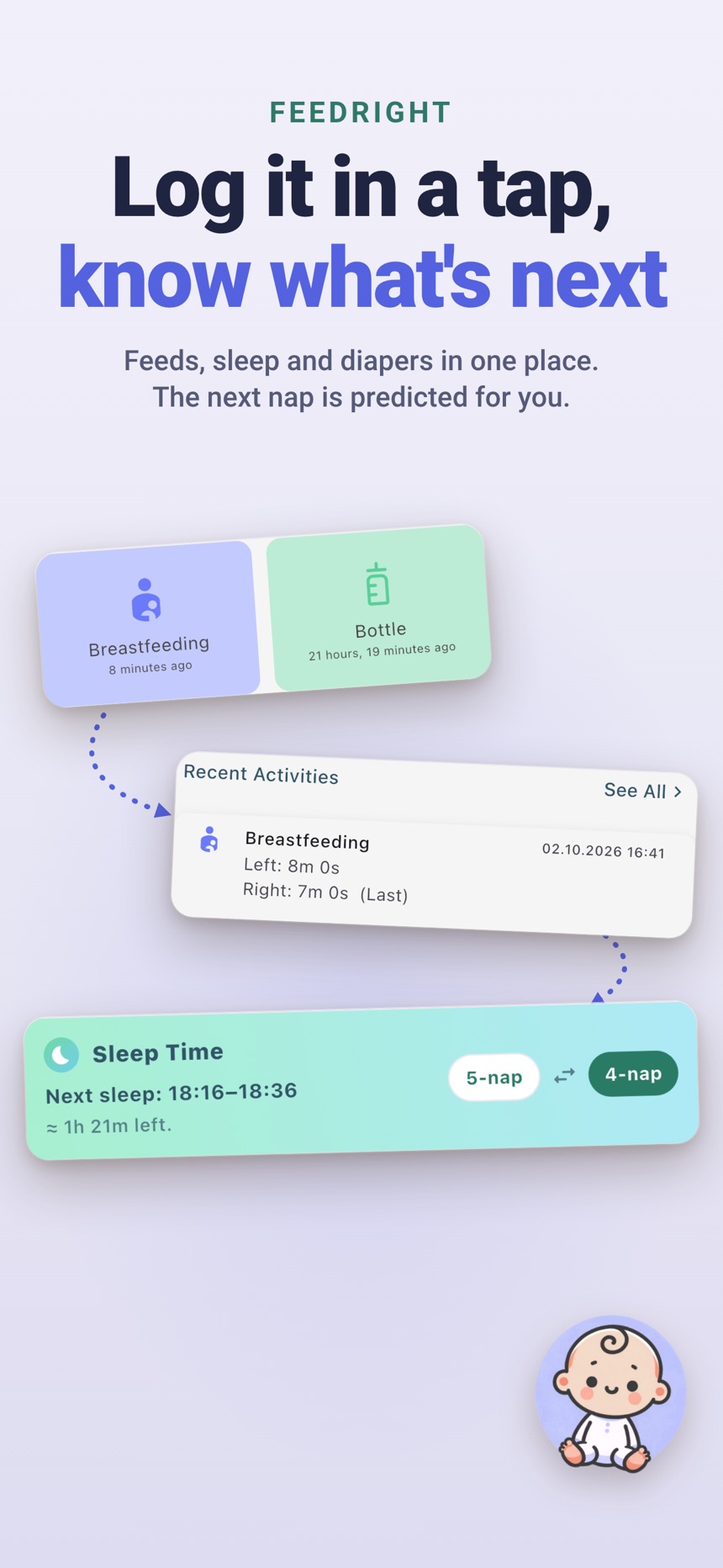
- One-tap logs for breastfeeding, bottles, pumping, sleep, and diapers, all in one timeline.
- Reminders you set yourself, such as a nudge a few hours after the last feed.
- With Premium, a partner, grandparent or nanny can join your family with an invite code or QR code.
FeedRight is available on the App Store for iPhone and Apple Watch and on Google Play for Android.
Frequently asked questions
What is the most useful parenting app for a newborn?
For most families it is a simple baby tracker that logs feeds, sleep, and diapers quickly and shows when baby last ate. Fast, one-handed logging matters more than a long feature list.
Do I need to track every feeding and diaper?
No. Track what makes the next decision easier, usually feeds, sleep, and diapers in the first weeks. If your pediatrician asks you to watch something specific, track that more closely.
Can both parents use the same parenting app?
Many tracking apps let a partner or caregiver share the same log, so everyone sees the last feed, nap, and diaper. Check how sharing works before you commit, since some apps include it in a paid plan.
Can a parenting app tell me if something is wrong with my baby?
No. A tracker can show patterns worth mentioning, but it is not a diagnosis. If something feels off, call your pediatrician or health visitor rather than waiting for the app to confirm it.
Is FeedRight free to use?
Yes. FeedRight’s core logs, timers, and reminders are free and show banner ads. FeedRight Premium is an optional subscription that adds cloud backup, family sync, full statistics, and removes ads.
Can a parenting app give a daily report of meals and naps?
Yes. Many baby tracker apps show a daily summary of feeds, solids, naps and diapers that works like a daily report for parents and caregivers. Check that the summary is easy to read at a glance before you choose one.