
A baby tracker comparison is less about finding the app with the longest feature list and more about finding one you can use with one hand while holding a sleepy baby. When your baby has just finished a feed, you do not need a dashboard full of charts. You need to know when they last ate, which side you nursed on, or how long that nap lasted.
The best tracker is the one that removes a little mental load from an already full day. For some families, that means a simple feeding and diaper log. For others, shared access, pumping records, or sleep patterns matter more. Here is how to compare baby tracking apps without turning the search into another parenting project.
Quick answer: When you compare baby trackers, test how fast you can log a feed, nap, or diaper with one hand, whether the last feed and side are visible at a glance, and how easily a partner can share the log. Then check privacy, ads, and what sits behind a subscription. A focused tracker you keep using beats a bigger app you abandon.
This guide is general information, not medical advice. Every baby is different, so ask your pediatrician or health visitor about your own baby.
What should a baby tracker make easier?
A useful baby tracker replaces the scraps of paper, half-remembered timestamps, and “Wait, did I change the last diaper?” conversations of the newborn stage. It should make common tasks quick to record and easy to look up later.
For most parents, the core needs are feeding, diapers, sleep, and growth. Feeding may include bottle amounts, nursing sessions, pumping, or solids as your baby gets older. Diaper tracking usually covers wet, dirty, or mixed diapers. Sleep tracking should let you start and stop a nap with minimal tapping.
The right level of detail depends on your situation. A pediatrician may ask about wet diapers during a feeding concern. A lactation consultant may want to see nursing duration and which breast was used. But if you are just trying to get through the first few weeks with a clearer memory of the day, a simpler record can be more helpful than a detailed one.
How does your daily routine shape the comparison?
Before comparing screens, prices, or features, think about the moment you will actually open the app. Are you logging a bottle while holding a fussy baby? Checking the last nap before bedtime? Handing off care to a partner, grandparent, or sitter?
A tracker that takes several taps to log one bottle can feel fine at first, then become annoying by day three. Look for a clear home screen, large controls, and a recent activity view that answers the question in front of you right now.
If both parents are involved in care, shared tracking is genuinely useful. It reduces duplicate feeds and makes handoffs less dependent on memory. Still, sharing only helps if setup is straightforward and updates appear reliably. Our guide to a shared baby tracker for couples covers what to look for.
For solo caregivers, the most important feature may simply be speed. One clean app that opens directly to feeding, sleep, and diapers can be better than a family organizer, community forum, milestone book, and tracker bundled together.
Which baby tracker features are worth comparing?
Not every family needs every feature. This is where many comparisons get noisy: they treat more options as automatically better. In real life, the best features match your feeding method, care setup, and level of energy.
Feeding logs
If you bottle-feed, check whether the app lets you enter an amount, the time, and a note if needed. Some parents also want to record formula versus breast milk, especially when bottles contain a mix of both. If bottles are your main need, see our roundup of the best apps for bottle feeding.
For nursing, look for a timer that tracks left and right sides separately and shows the last side at a glance, not buried in a history screen. If you pump, decide whether recording volume and session times would be useful or just create another task.
As your baby starts solids, a food log can help you remember new foods and notice patterns. It is handy, but it does not need to be the deciding factor during the bottle-and-nap stage.
Sleep tracking
Sleep is often the feature parents expect to use most, but a complicated sleep system can create more stress than insight. For newborns, a start and stop nap timer plus a simple daily timeline is often enough.
Some apps offer wake windows, next-nap estimates, and coaching-style suggestions. These suit families who like patterns and gentle guidance. They can also feel discouraging when your baby does not follow the estimate, which is perfectly normal. Treat suggestions as clues, not rules.
A good sleep log helps you spot a rough rhythm over time. It should not make you feel like you are failing because your baby took a 22-minute contact nap instead of the nap the app expected.
Diapers, medicine, and health notes
Diaper logs are basic, but they matter most when they are easy to enter. During the newborn weeks, knowing the number of wet and dirty diapers is useful for your own peace of mind and for conversations with your care team.
Medicine reminders and health notes help when your baby is sick or taking a temporary medicine. Be careful with apps that present tracking as medical advice, though. An app can keep a clear record, but it cannot diagnose dehydration, feeding problems, or illness. When something feels off, call your pediatrician.
Trends and reports
Charts are useful after a few days of logging. A simple view of feeds, sleep stretches, or diaper counts may help you notice changes, and some apps let you export data or share a report with your doctor.
But charts only help when the logging itself is easy. Do not choose an app for its reports if you already know you will stop entering data after a week.
Simple apps or all-in-one parenting platforms?
A focused tracker has a clear advantage: less friction. It opens fast, keeps the main actions visible, and does not ask you to learn a whole parenting system. For tired parents, that simplicity is not a compromise. It is often the point.
All-in-one platforms make sense if you want feeding logs, developmental content, family scheduling, memories, shopping lists, and community support in one place. The trade-off is more menus, notifications, accounts, and subscription prompts.
| Feature | Focused baby tracker | All-in-one parenting platform | Paper notebook |
|---|---|---|---|
| Logging speed | Fastest, one or two taps | Often slower, more menus | Fast if the pen is nearby |
| Sharing with a partner | Usually built in | Usually built in | Only if you are in the same room |
| Patterns and charts | Basic to detailed | Detailed | You add it up yourself |
| Extra content | Little or none | Articles, community, shopping | None |
| Best for | Tired parents who want quick answers | Families who want one hub | The first few days, or no-phone moments |
There is no wrong choice. If you enjoy detailed data and use several caregiving tools, a broader app may suit you. If you want a practical record of what happened today, a lightweight tracker is likely to fit better. For a step-by-step checklist, read how to pick the best baby tracker app.
What should you ask before you download?
A quick test tells you more than a long feature comparison. Open the app and ask yourself: Can I log a feed in a few seconds? Can I see the last diaper and nap without searching? Would my partner understand it without a tutorial?
Also consider privacy and cost. Check whether the app requires an account, whether syncing is optional, whether it shows ads, and which features sit behind a subscription. Paying for an app can be worthwhile if it solves a real problem, but the value should be clear before you commit.
Notifications deserve a close look, too. Reminders help for medicine, a scheduled feed, or a pumping session. Too many alerts make a parenting app feel like another demanding voice in your day.
Choose the one you will keep using
The most accurate baby log is not the one with the most categories. It is the one you can keep up with when you are tired, out of the house, or passing the baby to someone else.
Start with your most frequent need. If you are tracking bottles, pick an app that makes bottles effortless. If sleep is the big question in your house, prioritize a clean nap timeline. You can always add more detail later.
How FeedRight helps
FeedRight Baby Tracker is built around the everyday basics: feeding, sleep, and diaper logging in one tap, without asking parents to manage a giant platform. It is free with banner ads, needs no account, and works offline.
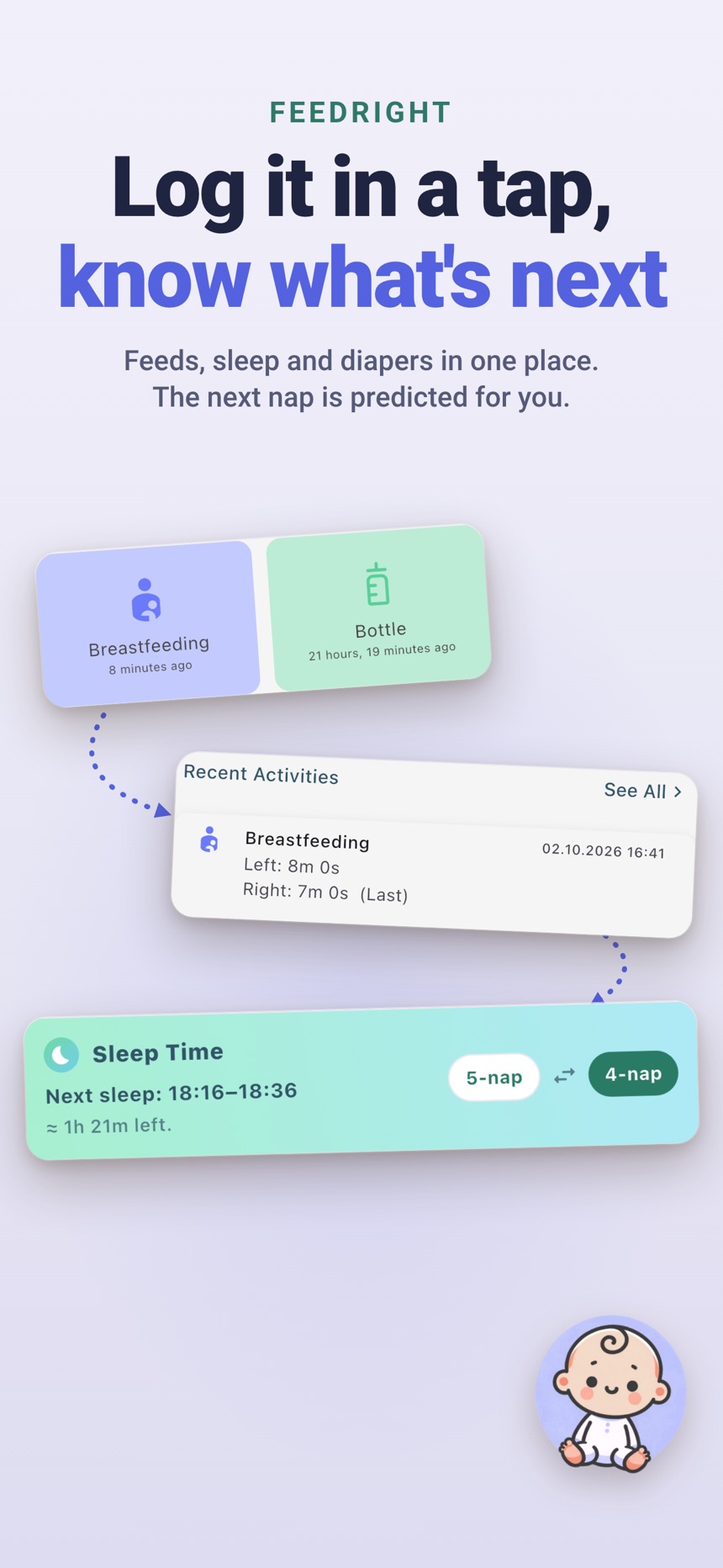
- Tells you how long it has been since the last feed and which breast you ended on.
- Logs bottles, pumping, solids, sleep, diapers, growth, and medicine, with a next-nap estimate from 3 months.
- FeedRight Premium, an optional monthly or yearly subscription, adds family sync across iPhone and Android, full statistics, widgets, the Apple Watch app, and no ads.
Try it on the App Store or Google Play.
Frequently asked questions
What is the most important feature in a baby tracker app?
Fast, one-handed logging. If you can record a feed, nap, or diaper in a tap or two and see the last feed at a glance, you are far more likely to keep using the app.
Is a free baby tracker app good enough?
Often, yes. Many free trackers cover feeding, sleep, and diaper logs well. Paid plans usually add things like syncing, detailed charts, or removing ads, so check what you actually need first.
Do both parents need the same baby tracker app?
It helps. When both caregivers log in the same app with sharing turned on, everyone sees the same last feed, nap, and diaper, which cuts down on double feeds and handoff questions.
Can a baby tracker app replace advice from a pediatrician?
No. A tracker keeps a clear record you can share at appointments, but it cannot diagnose feeding problems, dehydration, or illness. Call your pediatrician when something feels off.
What is the easiest baby tracker to use when you are exhausted?
The easiest baby tracker when you are exhausted is one that logs a feed, nap or diaper in one or two taps and shows the last feed on the first screen. Features you have to dig for will not get used at 3 a.m., so test that before you commit.
How can family members compare a baby’s sleep data?
Family members can compare a baby’s sleep data by logging naps and night sleep in one shared tracker, so everyone sees the same timeline and daily totals. Without a shared log, each person only sees the shifts they covered.