
Did the last feed happen two hours ago, or three? Sooner or later, every new parent asks that question. You reach for your phone to check the time, and then realize you never wrote down when the feed actually started. This is the moment that decides how a parent ends up tracking their baby, and it is usually decided in exhaustion, not in a calm planning session.
Most parents start with whatever is closest. A notebook by the crib. A notes app. Scribbles on the back of a hospital handout. It works for the first few days, mostly because the first few days are slow and a newborn’s routine is the only thing on the calendar. Then sleep debt builds up, visitors show up, and the question stops being “what should I track?” and becomes “what can I actually keep up with?”
Quick answer: For most new parents, a baby tracker app beats a notebook once the newborn is more than a week or two old, because the app does the time math, works with one hand in low light, and lets both parents see the same record. A notebook still makes sense for parents who prefer pen and paper and have a partner who updates it every time.
This guide is general information, not medical advice. Every baby is different, so ask your pediatrician or health visitor about your own baby.
Disclosure: Digital Traffic Labs makes FeedRight. We mention it where it fits and explain our criteria, so you can judge every option for yourself.
The real problem is not which tool is better in the abstract. It is that newborn tracking has to survive interrupted sleep, one free hand, and a brain running on fumes. Whatever method cannot survive those three conditions gets abandoned within a week, no matter how good the intentions were on day one.
Why do new parents still choose between an app and a notebook?
What is a baby tracker app?
A baby tracker app is a phone app built to log feeding times, sleep and diaper changes with a tap or two, instead of writing each entry by hand. It is designed for speed, often while you are holding a baby. For what to look for, see our guide on how to pick the best baby tracker app.
Both methods exist for the same reason: pediatricians ask about feeding and diaper frequency at early checkups, and most parents cannot reliably recall it after a few sleepless nights. Something has to hold that information, because the brain will not.
The notebook is the older, more familiar answer. It needs nothing but a pen, it never runs out of battery, and it feels more real to some parents than tapping a screen. For the first few days home, when visitors are helping and naps are still possible, a notebook can genuinely keep up.
Why do parents still try the notebook method?
A lot of parents start with a notebook because it feels simple and screen-free, especially after a hospital stay full of monitors. There is also a real instinct not to hand a newborn task over to another app.
The problem shows up around week two. Feeds happen every two to three hours around the clock, and writing a timestamp, a duration and a side (for breastfeeding) by hand, in low light, with one hand, becomes its own small task layered on top of an exhausting one.
Where do both methods start to break down?
A notebook and a generic notes app share the same weak point: neither does the math for you. If you want to know how long it has been since the last feed, a notebook means flipping back a page and subtracting by hand, half asleep. That single piece of friction is usually what makes the decision easy once a parent has lived it for a week. Our post on a feeding timer versus a notebook looks at the same trade-off for feeds specifically.
Baby tracker app vs. notebook: how do they compare side by side?
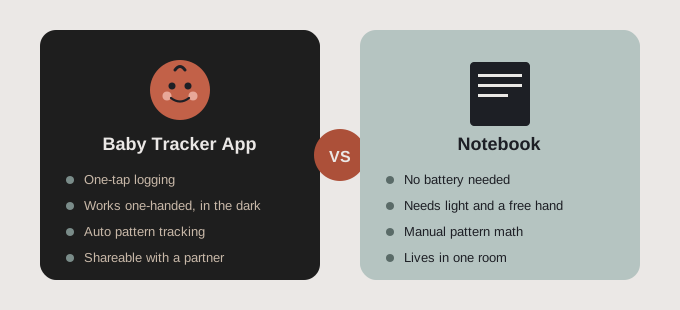
| What matters at 3 a.m. | Baby tracker app | Notebook |
|---|---|---|
| Logging speed | One or two taps, timers start and stop for you | Write time, duration and side by hand |
| Night use | Works in low light with one hand | Needs a free hand and enough light to write |
| Time since last feed | Shown automatically | Flip back and subtract |
| Patterns over days | Totals and history built in | Re-read pages and compare yourself |
| Sharing | Can sync between phones, depending on the app | One copy, in one room |
| Battery and screens | Needs a charged phone | Never runs out, no screen |
Speed and one-handed use
An app logs a feed with a tap, often started when the feed begins and stopped when it ends, with no writing required. A notebook needs both a free hand and enough light to see what you are writing, which rarely lines up with a 3 a.m. feed.
Spotting patterns over days and weeks
A notebook holds individual entries, but spotting a pattern, such as shorter naps this week or a feeding interval that is stretching out, means re-reading several pages and comparing by hand. An app shows totals and history without extra work from a tired parent.
Sharing with a partner or pediatrician
A notebook lives in one room, readable by whoever is holding it. An app with sharing lets either parent check the log from their own phone, and you can show it to a pediatrician without flipping through pages to find the right week. If two of you are trading shifts, our guide to a shared baby tracker for couples covers how to set it up.
When does a notebook still make sense?
To be fair to the notebook: it does not need charging, it does not ask for an account, and some parents simply think better with a pen in hand. For the first few days home, or for a parent who only wants to jot the occasional note rather than a full log, a notebook is a perfectly reasonable choice.
Where it tends to fall short is not the first few days. It is the weeks that follow, once exhaustion sets in and the entries that matter most are the ones least likely to get written down accurately.
How do you choose the method you will actually stick with?
The honest test for either method is not which one sounds more organized on day one. It is which one survives week three, when sleep is shortest and patience is thinnest. According to HealthyChildren.org from the American Academy of Pediatrics, newborns typically feed every 2 to 3 hours around the clock in the early weeks, which is exactly the schedule that makes a tracking method either sustainable or abandoned within days. Your pediatrician can tell you what feeding pattern to expect for your baby.
If the early weeks of tracking newborn feeding, sleep and diapers already feel like too much to manage by hand, the decision has probably been made by exhaustion, not preference. And if you have already lost count of the last time your baby fed, a notebook page will not fix that, but a one-tap log can.
How FeedRight helps
FeedRight Baby Tracker is the app we build for this comparison. It logs feeds, sleep and diapers in one tap on iPhone, Apple Watch and Android, and keeps every entry in a daily summary and history, so nothing depends on handwriting you can barely read the next morning.
- Free core logging with no account needed; data stays on your phone and it works offline.
- Live feed and sleep timers on the iPhone Lock Screen and Dynamic Island, plus dark mode.
- Optional FeedRight Premium adds cloud backup and family sync across iPhone and Android.
Like a notebook, it is a memory aid rather than medical advice. Find it on the App Store or Google Play.
Frequently asked questions
Is a baby tracker app better than a notebook?
For most parents, yes, once the newborn is more than a week or two old. An app removes the math, searching and handwriting that a tired parent cannot reliably do at 3 a.m., while a notebook mostly keeps up in the first few days.
Why do notebooks stop working for newborn tracking?
Notebooks do not do the math for you. Working out how long it has been since the last feed means flipping back a page and subtracting by hand, which gets harder once feeds happen every two to three hours around the clock.
Can you use a baby tracker app one-handed at night?
Yes, most baby tracker apps log a feed with a tap or two. In FeedRight, you can also follow a running feed or sleep timer on the iPhone Lock Screen, and dark mode keeps the screen easy on tired eyes.
Can I use both an app and a notebook?
You can, but pick one as the main record so caregivers do not end up with two versions. Some parents keep a notebook for occasional notes and use an app for feeds, sleep and diapers.
How do you choose a baby tracker for newborn routines?
Choose the baby tracker you can use one-handed in the dark and will still use in week three, not the one with the most features. Check that it logs feeds, sleep and diapers quickly, shows the time since the last feed, and can be shared if two people care for the baby.
Do baby tracker apps track naps and night sleep differently?
Many baby tracker apps log every sleep with a start and end time, so daytime naps and night sleep appear in the same timeline and daily totals. Look at the history view of the app you pick to see how it separates naps from longer overnight stretches.