
It usually happens somewhere between the third diaper and the fifth feed of the day. You know the baby last ate recently, but was it 90 minutes ago or closer to three hours? Did that diaper happen before the short nap or after? When you are tired, small details blur fast. That is exactly why finding the best baby tracker app matters: not as one more thing on your phone, but as a simple backup for your memory when the days start running together.
A good baby tracker should make life lighter, not turn parenting into data entry. Many apps promise everything, then bury the basics under extra tabs, charts, social features or settings you never asked for. For most parents, the best app is not the one with the longest feature list. It is the one you can open with one hand, log in two taps, and trust when you are half awake.
Quick answer: The best baby tracker app is the one you will still use in week three. Look for one-tap logging of feeds, sleep and diapers, a clear timeline that answers “when did the baby last eat?” in seconds, and easy sharing if more than one person cares for your baby. Test it for two ordinary days before you commit.
This guide is general information, not medical advice. Every baby is different, so ask your pediatrician or health visitor about your own baby.
Disclosure: Digital Traffic Labs makes FeedRight. We mention it where it fits and explain our criteria, so you can judge every option for yourself.
What should the best baby tracker app actually do?
A baby tracker app is a phone app for recording a baby’s feeds, sleep and diapers as they happen, so parents and other caregivers can see the day at a glance and spot patterns over time.
At a minimum, most parents want the same core things: feeding, sleep, diapers, and maybe growth or pumping. These are the patterns that shape your day, and they are also the ones pediatricians tend to ask about early on.
The best baby tracker app keeps those core actions front and center. If feeding is your biggest concern, starting and stopping a bottle or nursing timer should feel obvious. If sleep is the daily mystery, nap tracking should be quick enough to use in real time. If diaper output matters because your baby is a newborn or adjusting to feeding changes, that log should be easy to find and even easier to update.
That sounds basic, but basic is the point. A baby app does not need to be clever. It needs to be useful one nap time at a time.
Why does simple usually beat feature-packed?
New parents are often told to track everything. That advice can help in short stretches, especially in the newborn stage. But there is a difference between useful tracking and exhausting tracking.
An overloaded app can quietly make things worse. If every log asks for too many details, you start skipping entries. If the home screen is cluttered, you hesitate before opening it. If it takes effort to remember where things live, the app becomes one more mental chore.
That is also why lightweight apps often age better than all-in-one parenting platforms. In the first weeks, a giant app can seem reassuring because it promises answers for everything. A month later, many parents realize they only use three features and wish those three were faster.
Which baby tracker features matter most in real life?
Four features decide whether a baby tracker stays useful after the first week:
| Feature | Why it matters | What to check |
|---|---|---|
| Fast logging | Slow logging leads to skipped entries and gaps in the record | A feed or diaper takes about two taps, even with one hand |
| Clear history | You need answers such as “when did the baby last eat?” in seconds | A plain timeline you can read at a glance, not only charts |
| The right amount of detail | Newborn needs differ from the needs of an older baby | Optional detail such as nursing side, ounces and diaper type |
| Shared caregiving | Shifts and handoffs create repeat questions | Simple setup and reliable sync for every caregiver |
Fast logging
Speed is not a nice extra. It is the whole game. If you cannot log a feeding or diaper change in a couple of taps, consistency drops, and partial data is often less helpful than simple, reliable data. Fast logging also matters when a partner, grandparent or babysitter uses the app too: nobody should need a tutorial.
Clear history
A tracker is only helpful if you can read the day at a glance. You should be able to answer simple questions quickly: When did the last feeding end? How long was the nap? How many wet diapers today? Pretty charts are fine, but they should not replace a clean timeline. Most tired parents want a plain answer before they want a graph.
The right amount of detail
This depends on your stage and your baby. Newborn parents may want timers, left and right nursing logs, ounces, diaper type and nursing sessions in detail. Parents of older babies may only care about naps, bottles, solids and rough routines. The best baby tracker app supports deeper tracking when you need it and stays out of the way when you do not.
Shared caregiving
If two adults are trading shifts, shared visibility prevents a lot of repeat questions. Our guide to a shared baby tracker for couples covers how to set that up without friction. Sharing is only useful when it is easy, though. If setup is fussy or syncing feels unreliable, the promise falls apart quickly.
How can you tell if an app will fit your routine?
Before downloading anything, know what problem you are trying to solve. Some parents need detailed logging for the first few weeks because a pediatrician asked for it. Others mostly want routine support so the day feels less chaotic. Those are different jobs.
If feeding is stressful, test how easily the app handles bottles, nursing, pumping or solids. If naps are the hard part, see whether sleep tracking is simple enough to use every single time. If you mostly want handoff clarity, pay attention to how clearly the app shows recent activity.
Reviews can mislead a little here. One parent calls an app perfect because it tracks ten categories. Another abandons it for the same reason. Our baby tracker comparison for tired parents lays out the trade-offs side by side. A good rule: if the app feels slightly annoying during a calm moment, it will feel impossible during a fussy one.
What mistakes do parents make when choosing a baby tracker?
One mistake is picking based on future needs instead of current needs. If you are in the thick of newborn feeding, you do not need a parenting control center. You need a reliable log that makes the next eight hours easier. Some parents start with paper, and our baby tracker app vs. notebook comparison explains when each one works.
Another mistake is overvaluing analytics. Pattern spotting can be useful, but only if the input stays consistent. A simpler app that you use every day will usually help more than a smarter app you stop opening after a week.
The third mistake is ignoring the other caregivers. If one parent loves the app but the other avoids it, the whole system gets messy. The best setup is the one everyone can use without friction.
A two-day test for any baby tracker app
You do not need a long trial to know whether a baby tracker works for you. Two ordinary days is often enough.
- Day one: log every feeding, diaper and nap as it happens. Notice where you hesitate or skip an entry because it felt like too much.
- Still on day one: check whether you had to hunt for basic actions, or whether the app helped you answer questions faster.
- Day two: open the history during a busy stretch and imagine your partner asking what happened over the last four hours. Can you answer in ten seconds?
- Day two: hand the phone to the other caregiver and see if they can log a feed without help.
If the app fails steps three or four, it may be collecting data without giving you clarity. That quick test tells you more than a long feature list ever will.
When is a simple tracker the better choice?
For many families, the sweet spot is a focused app that does the basics really well: quick logging, a clean timeline and just enough structure to spot patterns. Not every parent needs milestone journals, community forums or endless customization.
There is no universal winner because babies are different, routines change, and parents have different tolerance for detail. A newborn family managing feeding concerns may want more structure than a family with a seven-month-old who mostly needs nap and bottle logs. Both are valid. If an app makes you feel more capable after a long night, that is the right signal to trust.
How FeedRight approaches baby tracking
That is the philosophy behind FeedRight Baby Tracker, the app we build at Digital Traffic Labs for iPhone, Apple Watch and Android. It logs feeds, sleep and diapers in one tap, shows how long ago your baby last ate and which side you finished on, and estimates when the next nap is due from 3 months of age.
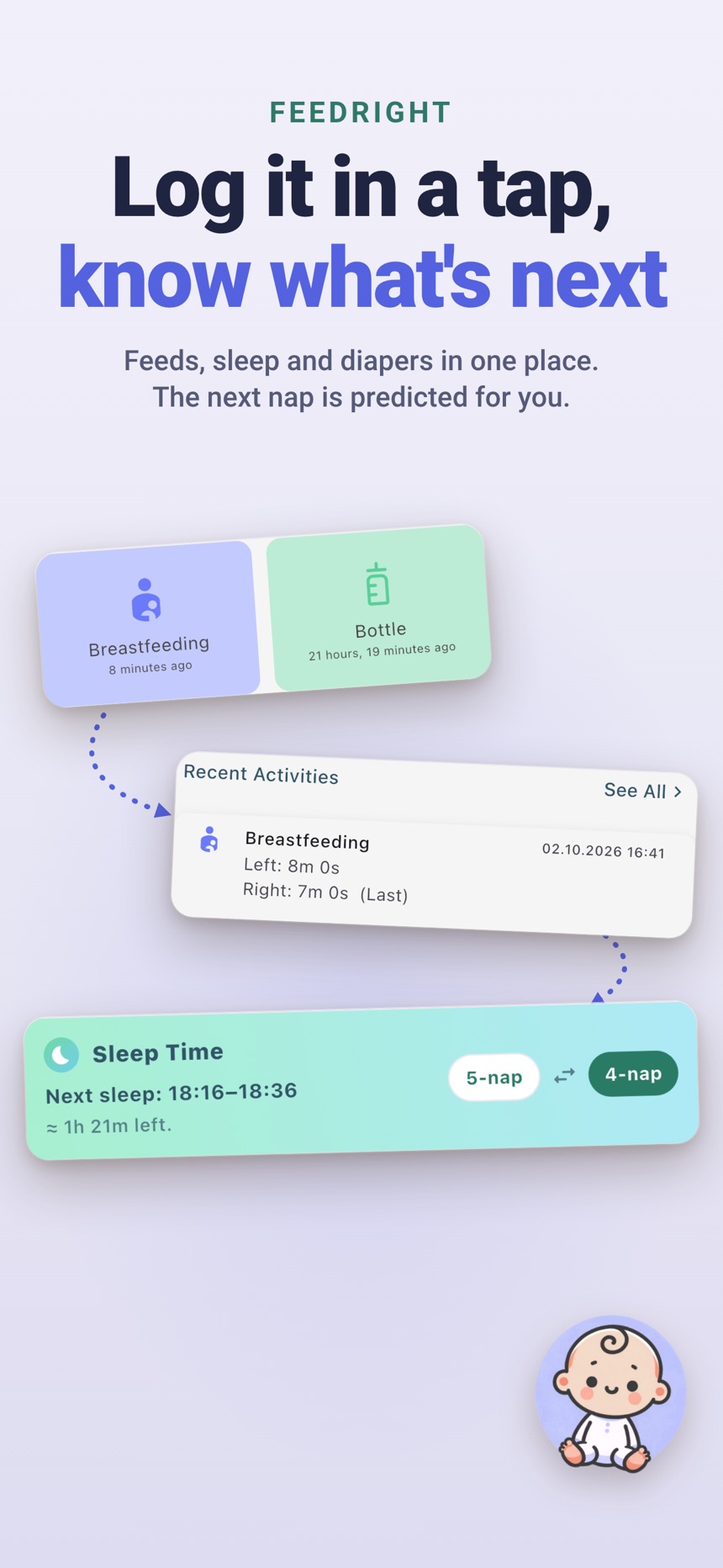
- Free core logging with no account needed; it works offline and keeps data on your phone. The free version shows banner ads.
- Live feed and sleep timers on the iPhone Lock Screen and Dynamic Island.
- Optional FeedRight Premium for cloud backup, family sync across iPhone and Android, full statistics and the Apple Watch app.
Try it on the App Store or Google Play and run the two-day test above.
Frequently asked questions
What features should a baby tracker app have?
At minimum, quick logging for feeds, sleep and diapers, plus a clear history you can read at a glance. Timers, growth logs and sharing are useful extras if your family needs them.
Do I really need a baby tracker app?
No, but many parents find one helpful in the newborn weeks, when feeds and diapers come often and sleep is short. A paper log works too if you keep it up.
How long do parents usually track baby feeds and sleep?
It varies. Many families track closely in the first weeks, then scale back to a few key details once routines settle, unless their pediatrician asks for more.
Can two parents use the same baby tracker?
Many apps allow it. In FeedRight, a partner or another caregiver joins your family with an invite code or QR code, and FeedRight Premium keeps both phones in sync across iPhone and Android.
Is a free baby tracker app good enough?
For many families, yes: free baby tracker apps usually cover quick logging of feeds, sleep and diapers, which matters most. Paid plans tend to add extras such as syncing between phones, backups, longer statistics or removing ads, so check whether you need those before you pay.
How do I choose a private baby tracker app?
Look for a baby tracker that works without an account, keeps data on your phone unless you choose cloud backup, and explains clearly where synced data is stored. Read the privacy policy before you enter your baby’s details.