
You know that feeling when someone asks “how long has the baby been asleep?” and your brain just returns a loading spinner? You were right there, watching the clock, and you still have no idea.
Sleep tracking sounds like a simple task. It is not. When you are operating on a few broken hours a night, remembering when the last nap started, let alone how long it lasted, is genuinely hard. And yet sleep is one of the most useful things to track in the newborn stage.
Quick answer: The simplest way to track a baby’s sleep schedule is to log each sleep the moment it starts and again the moment your baby wakes, rather than reconstructing it later. A baby tracker app turns this into two taps and adds up the totals for you. After a few days, look at daily totals and recurring windows, not single naps.
This guide is general information, not medical advice. Every baby is different, so ask your pediatrician or health visitor about your own baby.
The problem is not that you are disorganized. The problem is that the tools most parents default to (mental notes, paper logs, a notes app) are not built for this. Here is how to make it work.
Why is it so hard to track a baby’s sleep schedule?
Here is how the usual tracking methods hold up.
| Method | How it holds up |
|---|---|
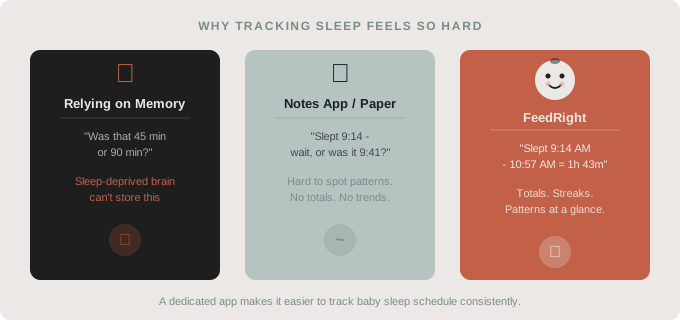
| Mental notes | Unreliable on broken sleep; nap times blur within hours |
| Paper log | Works, but you calculate durations and totals by hand |
| Notes app | A scrolling list of timestamps; you subtract times yourself |
| Baby tracker app | Logs start and wake in a tap and adds up totals for you |
What is a baby sleep schedule?
A baby sleep schedule is a running record of when your baby falls asleep, when they wake up, and how long each sleep lasts, across both naps and overnight stretches.
For newborns, sleep does not follow a fixed rhythm. It is irregular and spread across small windows throughout the day and night. “Schedule” is almost a generous word for it: in the early weeks, it is more of a log than a plan. But that log is exactly what you need to spot patterns, talk with your pediatrician, and notice when your baby starts to consolidate sleep. Our guide on baby nap patterns in the first year shows how that changes over time.
The challenge is that each nap starts and ends at a random moment, often when you are already holding the baby, feeding, or half asleep yourself.
Why don’t mental notes work?
A sleep-deprived brain is not a reliable storage device. You can be completely certain the nap started at 10:20, and two hours later have no idea if it was 10:20 or 10:50. This is not carelessness. Broken sleep makes it harder for anyone to remember times and keep track of how long ago something happened.
Why do paper logs and notes apps fall short?
Paper logs and general notes apps are better than nothing, but they have one big problem: you have to calculate everything yourself. When did the last nap end? How much total sleep did the baby get today? Is this nap longer or shorter than yesterday’s?
With a paper log, answering those questions means mental math at 3 a.m. With a notes app, it means scrolling through a chaotic list of timestamps looking for patterns that are not visible at a glance. Neither tool was built for sleep tracking. They are just the tools that happened to be nearby.
How do you track a baby’s sleep schedule effectively?
Start the timer when sleep starts
The single most important habit is logging the moment sleep begins: not after the nap ends, not when you remember. The second your baby’s eyes close and you lay them down, tap start.
This is where most tracking attempts break down. Parents plan to “log it in a minute,” and then the minute passes and they are guessing. An app that makes the start tap as easy as possible removes most of the friction. For more ideas, see how to record baby naps without making it a chore.
Log wake time immediately too
The end of a nap is easier to catch, because your baby usually announces it clearly. Log wake time the moment you pick them up or they start fussing.
This gives you the actual duration without any math. A dedicated app calculates it automatically. With a notes app, you will need to subtract yourself, which works but adds friction.
Check totals daily, not just individual naps
One nap’s duration tells you very little. What matters more is total daily sleep and how it spreads across the day and night.
Newborns sleep a lot, in short stretches, and how much varies from baby to baby; total sleep slowly decreases and shifts toward the night as they grow. The NHS has a clear overview of how newborn sleep works and how to help your baby sleep. Knowing where your baby actually lands each day, and whether naps make up for short nights, is the kind of pattern you can only see when you track consistently. If you are unsure whether your baby is sleeping enough, ask your pediatrician.
What should you do with the sleep data you collect?
After a few days of tracking, the data starts to speak for itself. Most parents notice patterns they had not seen before: a predictable fussy window, a nap that is consistently short, a night waking that clusters around the same time.
Bring these logs to your pediatrician appointments. A week of sleep data is far more useful than “I think she sleeps about 14 hours, maybe?”
You can also use patterns to plan. If your baby reliably naps from 10:00 to 11:30 a.m., you can plan calls, errands or rest around that window. The data does not change your baby’s sleep, but it changes how prepared you feel. When you are ready to shape the day a little more, our baby sleep schedule guide for the first year covers wake windows and bedtime.
Whatever the log shows, keep sleep itself safe: place your baby on their back, in their own crib or bassinet, on a firm, flat surface with no loose bedding. The American Academy of Pediatrics explains the details in its parent’s guide to safe sleep.
How do you make sleep tracking a habit when you are running on empty?
The hardest part of any tracking system is keeping it going when you are exhausted. What works is tying the logging action to something you already do every time:
- You lay the baby down: tap start.
- You pick the baby up: tap stop.
- Once a day, at a calm moment, look at the totals.
No separate “I should log this” thought required. Keep your tracking app on your home screen so it is the first thing you see when you pick up your phone. The fewer steps between “baby fell asleep” and “sleep logged,” the more likely you are to keep going.
If you are already tracking feeding times, pairing that with sleep gives you a much fuller picture. Many patterns that look like sleep problems are actually feeding-related, and you cannot see the connection without both. Our guide on how to track newborn feeding, sleep and diapers covers that side.
How FeedRight helps you track baby sleep
To track a baby’s sleep schedule consistently, you need a tool that works in the dark, one-handed, on two hours of sleep. FeedRight Baby Tracker logs sleep, feeds and diapers in one tap on iPhone, Apple Watch and Android, and our post on how a baby sleep tracker app eases your routine shows how it fits into a day.
- Free: a one-tap sleep timer that stays live on the iPhone Lock Screen and Dynamic Island, where you can also end a sleep, plus a daily summary and statistics for the last 3 days. No account needed.
- From 3 months of age, a “Sleep Time” card estimates when the next nap is due.
- Optional FeedRight Premium adds 7 and 28 day statistics, a daily sleep score and family sync.
It helps you remember, and sleep questions still belong with your pediatrician. Search for FeedRight on the App Store or Google Play.
Frequently asked questions
How do I track my baby’s sleep schedule without forgetting?
Log the moment sleep starts, not after the nap ends, and log wake time as soon as your baby wakes. A baby tracker app makes each entry a single tap, which removes the friction that makes most parents fall behind.
What is a normal sleep schedule for a newborn?
There is no fixed schedule in the early weeks. Newborns sleep a lot, in short and irregular stretches across day and night, and patterns slowly emerge over the first months. Ask your pediatrician if you are worried about how much your baby sleeps.
Is a paper log enough to track baby sleep?
A paper log works, but you have to calculate durations and totals by hand. An app does the math automatically and makes it easier to spot trends across several days.
What should I log for each baby nap?
The time your baby fell asleep and the time they woke up. Where they slept or how they fell asleep is optional and only worth noting if it helps you spot a pattern.
Can a baby sleep tracker help my baby sleep better?
A baby sleep tracker does not change how your baby sleeps; it records when sleep happens so you can see patterns and plan around them. Questions about how much your baby sleeps belong with your pediatrician.
How should a baby sleep safely?
Place your baby on their back to sleep, in their own crib or bassinet, on a firm, flat surface with no loose bedding. The American Academy of Pediatrics recommends these safe sleep basics for every nap and every night.