
You have two favorite photos, a little curiosity, and a phone full of apps that promise a magical result. The real problem is not finding the best baby photo prediction tools. It is figuring out which ones make a sweet, shareable image without asking for too much personal data, burying you in editing controls, or pretending they can predict a real child.
Quick answer: No baby photo prediction tool can show what a real child will look like, because appearance depends on genetics and chance that photos do not reveal. The best tools are honest, simple AI apps that turn two clear parent photos into an imagined portrait for fun. Choose by output style, photo workflow, cost model, and privacy terms, not by accuracy claims.
Disclosure: Digital Traffic Labs makes Future Baby AI Generator. We mention it where it fits and explain our criteria, so you can judge every option for yourself.
What is baby photo prediction?
Baby photo prediction is an AI image feature that uses photos of two people to create an imagined picture of what a future child could look like. It is entertainment and a keepsake idea, not a scientific forecast or a genetic assessment.
The reason is biology. A child’s observable traits, what geneticists call the phenotype, come from many genes interacting with each other and with the environment. A photo shows the parents’ faces, not which versions of those genes a child would inherit.
That distinction makes the experience better. You can enjoy the surprise, send it to a partner, or save it for a baby shower without putting pressure on a generated image to mean more than it does.
What makes a baby photo tool worth using?
A good result starts with a good input. Look for a tool that clearly tells you to use front-facing, well-lit photos where faces are easy to see. The software cannot invent reliable detail from a blurry group selfie, sunglasses, dramatic shadows, or an image where one face fills only a tiny part of the frame.
Ease matters just as much. Many people want a quick, fun answer while waiting for coffee or sharing a laugh with their partner. A focused flow with a few straightforward choices is often more enjoyable than a complicated editor with dozens of styles, sliders, and menus.
Unlike a generic AI image generator that asks you to steer every detail, a focused baby photo tool lets you make a keepsake in a few clear steps. That does not make it better for every creative project, but it is usually a better fit for this one.
Privacy deserves a pause before you upload. Read what the app says about image processing, storage, deletion, account requirements, and sharing. A face photo is personal, even when the result is meant to be lighthearted. If the explanation is hard to find or hard to understand, choosing a different tool is reasonable.
How do you compare baby photo prediction tools?
There is no single winner for every couple, family, or curious friend group. The right choice depends on whether you value a fast mobile experience, more artistic control, a no-account option, or clear information about how photos are handled. For a side-by-side look at the main types, see AI baby visualizers compared.
Start with the kind of result you want
Some tools aim for a fairly natural-looking portrait. Others make stylized images with cartoon features, soft studio lighting, fantasy settings, or older-child age variations. Neither approach is more accurate, because the image is still AI-generated. The choice is about your taste. A clearly artistic style can be the more comfortable choice if you would rather people not read too much into the outcome.
Check the photo workflow
The simplest apps ask for one photo of each person and handle the rest. That is useful when you want a fast result, but you may have less control over the look. Other tools let you choose an age range, background style, or format, which can be enjoyable if you like experimenting.
Try not to judge a tool by its first output alone. Use the same kind of source photos when comparing options, then consider whether the result looks clean, balanced, and consistent with the style it promised. Our photo checklist for future baby apps lists what to check before you upload.
Notice what happens after generation
Can you save the picture cleanly? Is it obvious how to make another version? Is the image clearly marked as AI-generated? Does the app force a long sign-up process or make you hunt for the image you just created? A lightweight tool should let you make the image, decide whether you like it, and move on with your day.
Choose privacy over curiosity when needed
Use photos you are already comfortable sharing digitally, and avoid images that reveal more than necessary in the background. If you are making an image with another person, ask first. A fun surprise stays fun when everyone is happy to be part of it.
Before you pick a tool, run through this short checklist:
- It describes the result as an AI-generated image for fun, not an accurate forecast.
- It explains in plain language how photos are processed and whether they are stored.
- It tells you up front whether an account or subscription is needed.
- It gives clear photo guidance, such as front-facing and well lit.
- It lets you save or share the result easily, with a clear AI label.
What trade-offs should you expect?
Fast tools often offer fewer controls. Tools with more editing options can create a more customized image, but they take longer to learn and can make the simple idea feel like a project. For most casual users, the better choice is the one that produces a pleasant result without extra friction.
Dedicated baby photo apps are usually stronger at giving you a clear starting point and a purpose-built flow. General AI image platforms can be better when you want specific creative directions, extensive retouching, or a custom scene around the portrait. They are simply solving a broader problem.
Cost models differ too. Some tools let you try a style before paying, while others need a subscription before you create anything. Check the current store listing so the price model does not surprise you, and pick the option that feels clear and fair for one small, enjoyable task.
| Option | Good to know |
|---|---|
| Dedicated baby photo app | A clear starting point and a purpose-built flow, with fewer controls |
| General AI image platform | More creative direction and retouching, but more to learn |
| Natural-looking style | Not more accurate; the image is still AI-generated |
| Clearly artistic style | Helps people not read too much into the result |
| Try before paying | Lets you test a style before you pay |
| Subscription first | Check the current store listing before you start |
How should you set expectations?
The most satisfying way to use these tools is to treat the output like a fortune-cookie message: personal enough to spark a conversation, but not a statement of fact. AI works by recognizing visual patterns and producing a new image from them. It does not know your future family. Our article on what a future baby generator can really show goes into the limits in more detail.
That is why results vary from one photo pair to the next. Lighting, pose, image quality, facial expression, and the model’s own design all influence what appears. If one version feels odd, clearer photos or a different style may produce a result you like more.
Keep the tone light when you share. A caption such as “our AI imagination at work” gives friends and family the right context and makes room for the real joy here: imagining possibilities together.
How Future Baby AI Generator approaches it
Future Baby AI Generator is our iPhone app for creating a lighthearted keepsake. You add a photo of each parent, choose boy or girl and an age range from baby to teenager, and an AI-generated image of an imaginary child appears in seconds. It is made for fun, not as genetic or scientific information.
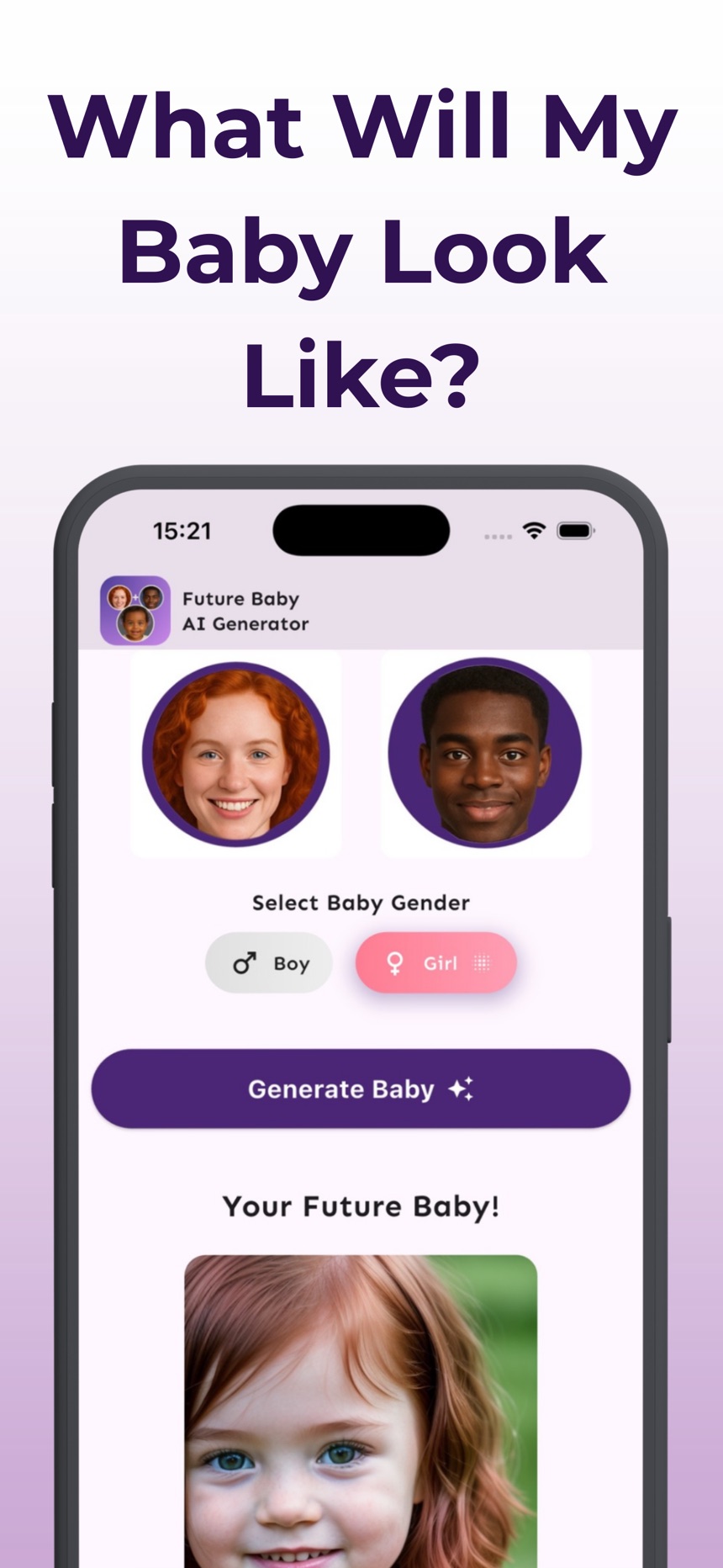
- Images are labeled as AI-generated, and you can save them to Photos or share them.
- Photos are used only to create the image and are not stored by the app.
- It works with any two parents, including same-gender couples. The app is free to download; creating images requires a subscription.
See the Future Baby AI Generator page for details, or get it on the App Store.
Frequently asked questions
Are baby photo prediction tools accurate?
No. They create an AI-generated interpretation of uploaded photos, not a reliable prediction of a future child’s appearance. They are best used as entertainment and a playful visual keepsake.
What photos work best for baby photo apps?
Clear, front-facing photos with good lighting and unobstructed faces give the tool more useful visual information. Avoid blurry images, heavy filters, dark shadows, and photos where faces are partly covered.
Should I use a general AI image app or a dedicated tool?
Use a dedicated tool when you want a quick, guided baby-photo experience. A general AI image app may be better when you want detailed creative control over styling, backgrounds, and edits.
Is it okay to use someone else’s photo in a baby photo app?
Only with their agreement. A face photo is personal, so ask before uploading a partner’s or friend’s picture, and avoid using photos of people who have not said yes.
What is a photo prediction app?
A photo prediction app uses AI to create an imagined image from your photos, such as a possible future child. Despite the name, it cannot predict anything real; the result is an AI-generated picture made for fun.
Do baby photo apps cost money?
Cost models differ: some tools let you try a style before paying, while others need a subscription before you create anything, so check the current store listing first. Future Baby AI Generator, for example, is free to download, and creating images requires a subscription.