
Two questions come up after almost every feed: When did the baby last eat, and which side did they nurse on? But when everyone is tired, finding the answer can feel strangely hard. The feeding timer versus notebook choice comes down to how easily you can capture the moment, find it later, and hand that information to someone else.
A notebook has been a trusted parenting tool for generations. A feeding timer on your phone is built for the pace of a newborn day. Neither option makes you a more attentive parent. The better choice is the one that helps you spend less energy remembering details and more energy responding to your baby.
Quick answer: A feeding timer usually works better for timing nursing sessions, remembering the last side, logging bottle amounts and sharing the latest feed with a partner. A notebook works better for handwritten observations and for parents who want less screen time. Many families use both: the timer for the facts, the notebook for the context.
This guide is general information, not medical advice. Every baby is different, so ask your pediatrician or health visitor about your own baby.
Disclosure: Digital Traffic Labs makes FeedRight. We mention it where it fits and explain our criteria, so you can judge every option for yourself.
What does a notebook do well?
There is something reassuringly simple about paper. Keep a notebook near the nursing chair, write down the time, and add a quick note if something feels different. No screen to unlock, no battery to charge, no settings to learn.
For some parents, writing is also a small pause. You may notice patterns more clearly when you physically record them: a fussy evening stretch, a longer feed before bedtime, or a day when diaper counts changed. If you already keep a baby journal, adding feeding notes in the same place can feel natural.
A notebook is especially useful when you want more than data. You can write, “Tried a new bottle nipple,” “Grandma gave 3 ounces,” or “Baby seemed sleepy but content.” Those little observations can matter when you are figuring out a routine or preparing a question for your pediatrician.
The trade-off is that paper asks more from you at the exact moment you have the least bandwidth. You need to find the notebook, find a pen, note the time, and do the math yourself later. If you are nursing, holding a sleepy baby, or trying not to turn on a light, even a simple written entry can get skipped.
Where does a feeding timer make daily life easier?
A feeding timer is made for quick, repeatable information. Tap to start a nursing session, stop it when you are done, and the app saves the duration. For bottle feeds, you can log the amount and time without doing mental arithmetic. The next time your partner asks when the last feed happened, the answer is there.
That speed matters because newborn care is not a tidy schedule. A feed can begin while you are on the couch, walking around the kitchen, or half awake in bed. A phone is usually nearby already, which makes a timer easier to use consistently. Our post on feeding timers for newborn days goes deeper into what a good one should do.
A good timer also removes a few common sources of confusion. Instead of trying to remember whether the last feed started at 9:40 or 10:10, you have a timestamp. Instead of wondering which breast was used last, you check the most recent entry. Over several days, you can tell the difference between “this feels constant” and “baby has actually been feeding every two to three hours.”
That does not mean every feed needs to become a project. The goal is not perfect records. It is a clear enough picture to support your next decision.
Sharing is often the deciding factor
The biggest weakness of a notebook usually appears when care is shared with grandparents or a partner. One parent writes a note, while the other is not sure where the notebook is. A babysitter or postpartum helper may not know the shorthand on the page. And if you are away from home, the notebook is on the counter right where you left it.
With a phone-based feeding tracker, it is easier to check the latest information during a handoff. “She had 4 ounces at 1:15” is more useful when everyone can see the same recent log. This is particularly helpful in the early weeks, when feeds blend together and both parents are trying to protect each other’s sleep.
Feeding timer versus notebook: what are the real trade-offs?
The choice is not really digital versus traditional. It is convenience versus flexibility, with your own habits in the middle.
| What you need | Feeding timer | Notebook |
|---|---|---|
| Speed at 3 a.m. | One tap to start and stop | Find a pen, check the clock, write |
| Last side and last feed | Shown automatically | You read back through the page |
| Bottle amounts | Saved with the time | Written by hand |
| Sharing with a partner | Easy to check from another phone | Only where the notebook is |
| Free-form notes | Usually short | As detailed as you like |
| Works without a phone | No | Yes |
A feeding timer is a strong fit if you like clear timestamps, share care with another adult, or often find yourself asking, “Wait, when did that happen?” A notebook is the better fit if you prefer writing by hand, want room for detailed observations, or are intentionally reducing phone use. It is also a good backup during a dead battery or a phone update.
There is also a middle path. Many parents use a timer for the basics and keep a notebook for occasional notes. The timer handles the facts: start time, duration, side, ounces. The notebook holds the context: a growth spurt suspicion, a new feeding position that worked, or a question to bring to an appointment. You do not need to record the same information twice. For a broader look at this choice, see baby tracker app vs. notebook.
How do you choose the method you will keep using?
The best system should feel lighter than your current mental load. If opening an app feels like one more thing to manage, start with a notebook. Put it where feeds happen most often, keep a pen attached, and make entries short enough that you will still write them at 3 a.m.
If writing things down keeps falling through the cracks, try a feeding timer. Use it for only the information you need most at first, such as feeding times and amounts. Once it becomes part of your rhythm, decide whether more detail would genuinely help.
It also helps to separate tracking from worry. A log can reveal a helpful pattern, but it cannot replace your instincts or medical guidance. If your baby is having trouble feeding, has fewer wet diapers than expected, seems unusually sleepy, or you are worried about weight gain, reach out to your pediatrician or a lactation professional. The AAP’s breastfeeding resources are a good general starting point. Your notes or timer history can make that conversation easier.
Is it okay to switch methods later?
Yes. Your needs will change quickly. In the first days home, you may want to record nearly every feed because everything feels new and important. A few months later, your baby may have a more predictable rhythm, and detailed tracking may no longer serve you.
You can stop. You can restart during a nursing issue, a return to work, a caregiver transition, or an illness. You can use a notebook for a weekend and a timer on weekdays. There is no award for the most complete feeding log.
How FeedRight helps
If you decide a timer is right for you, FeedRight Baby Tracker is the one we make. It runs on iPhone, Apple Watch and Android, needs no account, and the timer and logs are free. FeedRight Premium is an optional subscription that adds family sync, so both parents see the same feeds on their own phones. Download it on the App Store or Google Play.
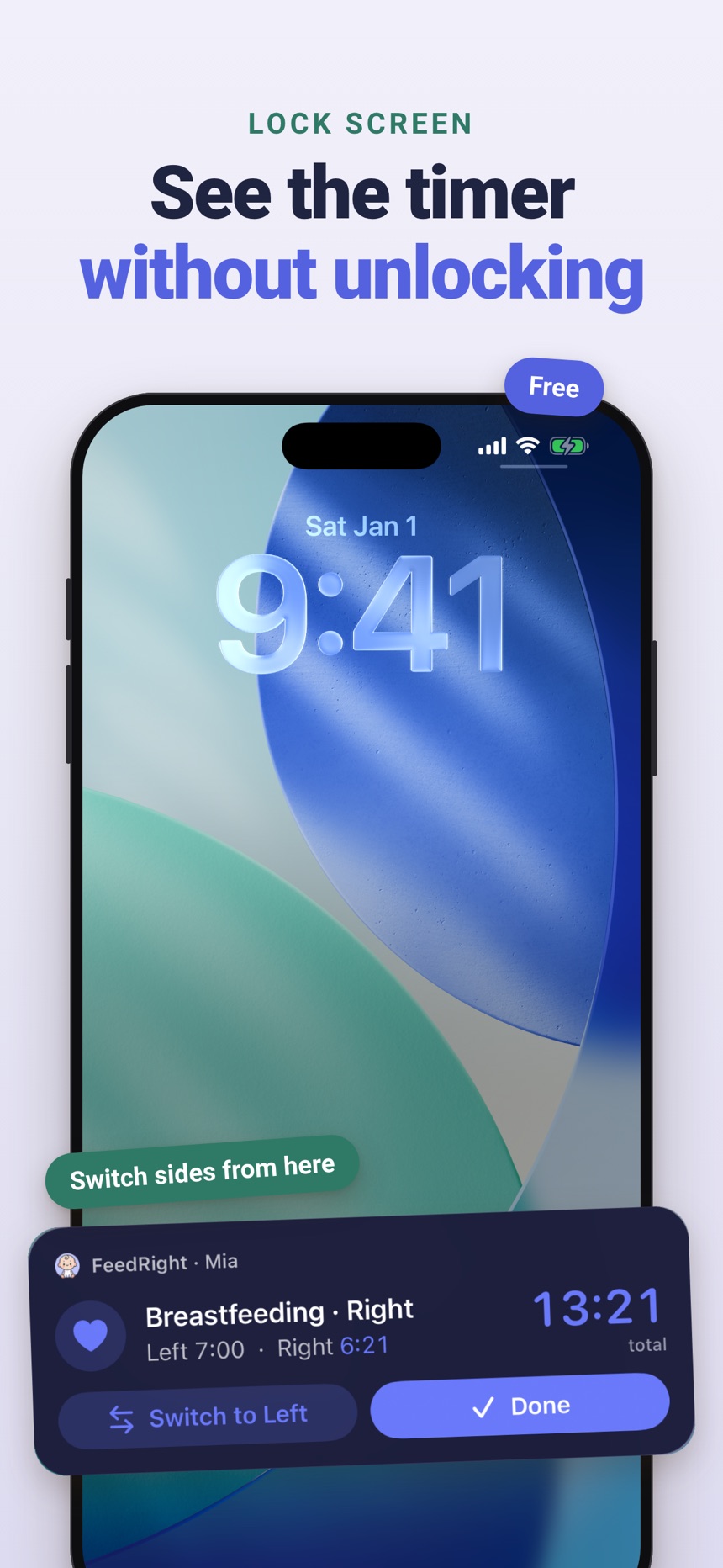
- Breastfeeding timer for left and right, with pause and switch, that remembers the side you finished on.
- Live feed timers on the iPhone Lock Screen and Dynamic Island, so you do not need to unlock the phone.
- Bottle logs in ml or fl oz, so amounts are written down instead of remembered.
Choose the approach that gives you a little more clarity and a little less guesswork. If that is a notebook, keep it simple. If it is a feeding timer, let it carry the details so your tired brain does not have to.
Frequently asked questions
Is a feeding timer better than writing feeds down?
For most tired parents it is faster, because it records the time, duration and side for you. A notebook is still a good choice if you prefer writing by hand or want space for longer notes.
Do I need to time every breastfeeding session?
No. Many parents only time feeds in the early weeks or when a pediatrician or lactation consultant asks for a record. Log what helps you, and stop when it no longer adds clarity.
How do I remember which side I nursed on last?
Write the side next to the time in your notebook, or use a feeding timer that saves the side you finished on and shows it before the next feed.
Can I use both a feeding app and a notebook?
Yes. A common setup is an app for times, sides and amounts, and a notebook for observations and questions for your pediatrician, so nothing is recorded twice.
What should I write in a baby feeding notebook?
Write the time of each feed, plus the side for breastfeeding or the amount for a bottle, and add a short note only when something stands out. Keep the notebook and a pen where you feed so each entry takes seconds.
Can a grandparent or babysitter use our feeding log?
Yes, if the log is easy to find and read. A notebook works when it stays in one spot and uses plain words instead of shorthand, while a feeding app lets a caregiver check the latest feed from their own phone.