
A useful article, a dinner recipe, a product you may want later, a video a friend sent. Saving takes one tap. Finding any of it again is the frustrating part. And since Mozilla shut Pocket down in 2025, many people are now looking for a new home for the links they used to send there.
Quick answer: The best Pocket alternative is the one that matches what you do after saving. Choose a read-later app if you mainly want to finish articles in a clean view, a bookmark or link-saving app if you want to find recipes, places and references again, and plain browser bookmarks if you only save a few pages. Start fresh rather than importing everything.
Disclosure: Digital Traffic Labs makes SocialMarks. We mention it where it fits and explain our criteria, so you can judge every option for yourself.
What is a Pocket alternative?
A Pocket alternative is an app or service that saves web pages and links for later reading, bookmarking, or organizing. The right option depends on whether you need a quiet reading queue, a searchable link library, or a lightweight mix of both.
What job do you need a Pocket alternative to do?
The word “save” covers several different habits, and mixing them together is how a useful system gets messy. A long feature story you plan to read on the couch is different from a restaurant you may visit, a parenting article you want to revisit, or a tutorial worth keeping for work.
Before moving your links, notice what happens after you save them. Do you open most of them within a day or two? Do you search for old pages by topic? Or are you collecting useful things with no need for a stripped-down reading view? Your honest answer matters more than a long feature checklist.
A quick way to match the job to the kind of tool:
| If you mainly want to… | Choose | Named in this post |
|---|---|---|
| Finish articles in a clean view | A read-later app | Instapaper |
| Keep articles, newsletters and highlights together | A reading workflow app | Readwise Reader |
| Group links in visual collections | A bookmarking tool | Raindrop.io |
| Find recipes, places and references again | A link-saving app | SocialMarks (iPhone) |
| Save only a few pages | Browser bookmarks | Built into your browser |
Read-later tools are for a short queue
A read-later app is best when the main goal is finishing articles away from a busy browser. These services usually simplify pages so ads, sidebars, and pop-ups do not compete with the words. They suit commuters, curious readers, or anyone who tends to open too many tabs during a break.
Instapaper is a familiar choice for people who mainly want a clean reading experience. It may be a better fit than a broader bookmarking app when reading is the whole point, not cataloging hundreds of references. The trade-off is that a reading queue can still become an intimidating pile if it has no limits. Our list of read later alternatives compares more options of this kind.
Bookmark tools are for things you want to find again
A bookmarking tool makes more sense for links that remain useful after one read. Think gift ideas, local services, how-to pages, travel notes, recipes, or articles you may share later. Organization matters here because the value is not in clearing a queue. It is in retrieving the right page when you need it.
Unlike a browser reading list that can become a long, unlabeled queue, a focused bookmark system lets you group useful links by the way you will look for them later. A few clear categories such as “home,” “weekend,” or “baby ideas” are often more helpful than a complicated tagging scheme you will not maintain.
Raindrop.io can be useful for people who want visual collections and more detailed organization. Readwise Reader can suit heavy readers who want articles, newsletters, and highlights in one reading workflow. Both are reasonable choices when their extra capabilities match an established habit. If you just want to save a link quickly and find it later, those added layers may be more than you need.
How do you choose a system you will actually maintain?
The most capable app is not automatically the one that fits your life. If every saved page requires choosing a collection, adding several tags, and writing a note, you may stop using it when you are busy. That is especially true when you are saving something with one hand while waiting in a pickup line or settling in after bedtime.
A better starting point is one default destination and a small number of folders or labels. Save first. Sort only the links that are worth keeping. This gives you the speed of a simple inbox without leaving every useful page in one mixed-up pile. Our guide on how to organize saved links without clutter shows a simple setup.
It also helps to separate temporary reading from lasting references. A reading queue can be cleared regularly without guilt. Your bookmarks can stay put, with just enough structure to make them easy to find. You do not need a perfect personal knowledge system to keep a handful of good links close by.
Ask four practical questions
- Where do you save links from? If most of your browsing happens on a phone, the mobile save flow should feel quick and obvious. A tool that is elegant on a desktop but awkward on your phone creates friction every time.
- Is the original page or a simplified reading view more valuable? A recipe, shopping page, or visual guide may work best as the original link. A long essay may be easier to finish in a clean reader.
- How will you find things again? Check whether you can pull up a saved page by a simple title, a category, or a keyword you remember.
- How much maintenance will you really do? Good organization should reduce mental load, not give you another tiny project to manage.
How do you move away from Pocket without carrying the clutter?
Do not treat a switch as a weekend cleanup assignment. Carrying every old link into a new app can also carry over the clutter you are trying to escape. Start with the pages you still expect to use.
For a week or two, save new links only in your chosen app. Notice whether you can do it without thinking and whether you actually return to what you saved. That small trial is more revealing than importing years of old bookmarks on day one.
Then bring over a limited set of lasting references: recipes you repeat, guides you trust, local resources, and pages tied to current projects. Leave behind expired shopping links, one-time news stories, and anything you would not recognize without opening it. A smaller library is easier to trust. For pages you truly need to keep, see how to archive web links without losing them.
Keep your saved links from becoming another feed
A saved-links app should not pressure you to keep consuming. Set a light routine instead. You might clear a few reading items on a quiet evening, archive finished pieces, or review one category before a trip or a home project.
The goal is not to reach zero. The goal is to make saved links useful at the moment you need them. A link you can find in ten seconds is more valuable than a perfectly organized archive you never open.
How SocialMarks helps
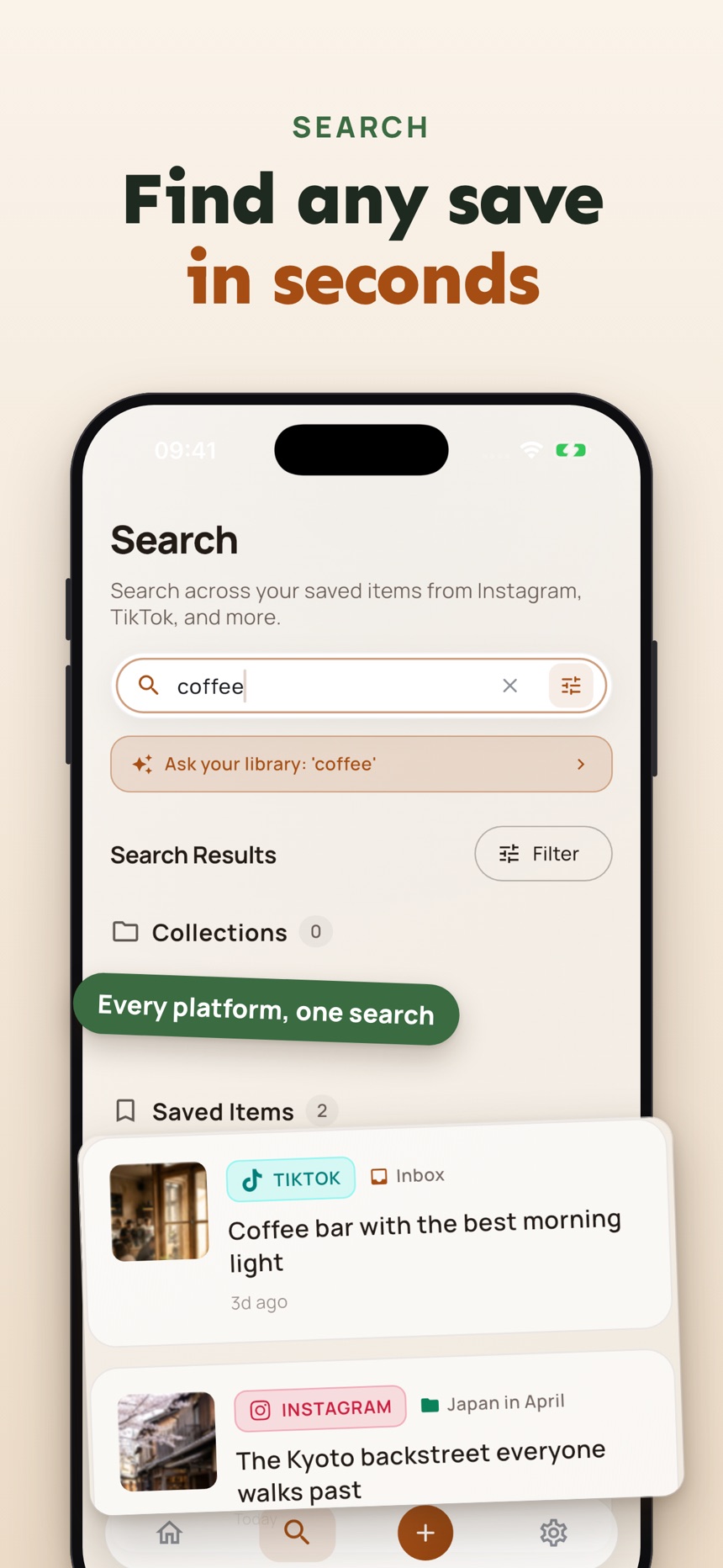
If most of what you used to put in Pocket was not long reading but recipes, places and products from social media, SocialMarks may be the better fit. It is our iPhone app for saving posts and links from Instagram, TikTok, YouTube and the web. It reads what you save (after you agree) and turns it into a recipe you can cook, places on a map, or an organized, searchable save. It is free to use with no ads and no account; SocialMarks Pro is an optional subscription. Visit the SocialMarks page or get it on the App Store.
- Save from any app through the iOS share sheet, including screenshots and photos.
- Search across everything you saved, with collections and tags from what each post says.
- A dead link check and a Private Vault locked with Face ID or Touch ID.
Frequently asked questions
Is a Pocket alternative only for reading articles?
No. Some alternatives focus on distraction-free reading, while others work better as organized bookmark libraries. Choose a reader if you want to finish long pieces, and choose a link organizer if finding useful pages again is the bigger need.
Should I import all my old saved links?
Usually, start with new saves and move only the old links that still matter. Importing everything can preserve useful history, but it can also recreate the same overloaded queue in a new place.
Are browser bookmarks enough?
They can be enough for a small number of pages you use often. A dedicated option becomes more helpful when mobile saving, simple categories, or faster retrieval would make your collection easier to use.
What is the best Pocket alternative for recipes and videos?
A link-saving app that understands social posts tends to work better than a read-later queue, because recipes and videos are things you use, not articles you read once.
What happened to Pocket?
Mozilla shut down Pocket in 2025, which is why many people are now looking for a new home for the links they used to save there. Start by deciding whether you mainly read articles or save links you want to find again.
Is Instapaper a good Pocket alternative?
Instapaper can be a good fit if you mainly want a clean place to finish articles, since its reading view is its main strength. If you also save recipes, places and products, a link-saving app may suit you better.