
You saved the recipe, the vacation hotel, the parenting tip, the new coffee shop, and that article you meant to read after the kids went to bed. Now they are somewhere in a browser menu, a text message, or a social feed you cannot quite remember. A bookmark links app exists for this exact problem: keeping useful things close without turning saving links into another chore.
Quick answer: A bookmark links app that stays useful does three things well: it saves a link from any app in a couple of taps, keeps it in a few broad, action-based collections, and lets you find it again by search. Pair it with a short exit plan for temporary links and a five-minute review, and saved links stay helpful instead of piling up.
The goal is not to build a perfect digital library. Most people do not need dozens of nested folders, elaborate tags, or a system that takes longer to maintain than it does to use. They need a quick place to save something when it matters and an easy way to find it when the moment comes.
Why do regular bookmarks get forgotten?
Browser bookmarks are useful in theory, but they often become a one-way door. You tap Save, feel organized for a second, then rarely open the bookmark menu again. The list grows, titles get vague, and older links disappear under newer ones.
Social platforms have the same problem. Saved posts are mixed in with random inspiration, funny videos, product recommendations, and things you only wanted to revisit for five minutes. Searching can help, but only if you remember where you saw the link and what the post was called.
A good link-saving habit starts with a smaller promise: save what you may genuinely use, then give it just enough context to be useful later. That could mean placing a link in a simple category such as Recipes, Family, Travel, or Read Later. It could also mean adding a short note like “make this for Saturday” or “ask pediatrician about this.”
What should a bookmark links app actually do?
The best apps in this category feel more like a reliable pocket notebook than a project-management tool. You should be able to add a link quickly, see what you saved, and find it later without learning a complicated system. Our guide to the best app to save links goes through the options in more detail.
Speed matters first. If saving a link takes too many taps, you will default to sending it to yourself in a text or leaving it open in a browser tab. A useful app makes capture feel natural when you come across something worth keeping.
Organization matters next, but only in a lightweight way. A few broad collections are usually enough. When every saved link needs three tags, a priority level, and a custom label, the app starts asking more of you than it gives back.
Finally, the app should make retrieval easy. Saving is only half the job. Can you quickly pull up the dinner idea you saved last week? Can you find the local activity page when Saturday morning arrives? If not, the system is collecting links, not helping you use them.
How do you build a simple bookmark links app routine?
The four habits in one view:
| Habit | What it looks like |
|---|---|
| Save with a reason | Ask “Will I want this again?” and add a plain note |
| Start with real-life categories | Four to eight, such as Read Later or Places to Go |
| Give temporary links an exit plan | Use a short-term collection or delete after use |
| Review in natural pauses | Five minutes: remove what is stale, open one or two |
Save links with a reason
Before you save something, ask one small question: “Will I want this again?” That does not mean every link has to be life-changing. A simple dinner recipe, a birthday gift idea, or a helpful how-to video can all earn a place.
What you can skip are links you are unlikely to open, posts you only saved because everyone else was sharing them, and information you can easily search for again. A little selectiveness keeps your saved list from becoming another endless feed.
When a link needs context, add a plain-language note. “Weekend project,” “try this nap schedule,” or “book before summer” is often more helpful than the original headline. Your future self is busy. Give them a clue.
Start with categories that match your life
Use categories based on the things you actually do, not the categories you think an organized person should have. A parent may want Kids, Meals, Home, and Weekend Plans. Someone planning a move may use Apartments, Neighborhoods, Furniture, and Paperwork.
Keep the number low at first. Four to eight categories is plenty for most people. If a category gets crowded, then split it. For example, Recipes can later become Quick Dinners and Baking. There is no prize for predicting every future need on day one.
A practical starting set might include Read Later, Things to Buy, Places to Go, and Ideas to Try. These work because they describe what you intend to do with the link, not just what the link is about. For more on this, see our post on link organization that keeps saves useful.
Give temporary links an exit plan
Some links are useful for a week and irrelevant after that. A camp registration page, a sale, a restaurant reservation menu, or a holiday gift guide does not need permanent storage.
Create a short-term collection for active plans, or make a habit of deleting links after you use them. A smaller collection with real possibilities is better than a giant archive full of expired intentions.
If you are not sure whether to keep something, leave it in Read Later for a limited time. When you open the app next week, either read it, move it to a meaningful category, or let it go. That decision takes seconds and prevents clutter from quietly building up.
Review when life gives you a natural pause
Do not schedule an hour-long organization session. That is the kind of plan that sounds good and never happens. Instead, check your saved links during small, natural moments: while waiting in the school pickup line, during a quiet coffee break, or when you are planning the weekend.
A five-minute review is enough. Look at what you saved recently, remove what no longer matters, and open one or two links you have been meaning to use. The point is not maintenance for its own sake. It is turning saved information into something helpful in real life.
Why organize links around real moments?
The strongest use case for a bookmark links app is not storing information. It is reducing friction when a moment arrives.
Think about a Friday evening when everyone is hungry and you need a dinner idea fast. Or a rainy Sunday when you want something easy to do with the kids. Or the first time you have ten quiet minutes to compare a few products you have been considering. In each case, searching from scratch adds work. A small, organized collection gives you a head start.
This is why broad, action-based categories work so well. “Weekend with Kids” is more useful than a highly specific category structure because it meets you at the point of need. You are not trying to remember how you filed something. You are thinking, “What can we do today?”
It also helps to save links from more than one place. Useful information often comes through social posts, group chats, search results, newsletters, and shared family messages. Keeping those finds in one personal space makes them easier to act on, even when the original source is long gone.
How do you choose the right app for your habits?
There is no single best setup for everyone. If you save a handful of links each month, a very simple app with basic categories may be all you need. If you collect research for hobbies, trips, or major purchases, search and notes may matter more.
The trade-off is simple: more features can create more control, but they can also create more work. For everyday use, choose the option you will still enjoy opening after the first week. Before committing to any app, imagine using it on a busy day and check:
- Can you save a link in a few seconds from the app you are already in?
- Will you understand where it goes?
- Can you find it later without remembering exact words?
Those are better tests than whether the app offers every possible setting.
How do you make saved links part of your life?
The easiest way to keep a bookmark habit is to connect it to something you already do. Save dinner ideas while scrolling before grocery shopping. Add local places when planning a free afternoon. Collect gift ideas as they come up instead of trying to remember them in December.
Use your saved links as a starting point, not a to-do list. You do not need to read every article or try every recipe. Some links will sit there for a while. That is fine. The app is there to give good ideas a chance to survive past the moment you found them.
A useful saved link is a small favor to your future self. Keep the system light enough that you will use it, and it can turn scattered online finds into easier meals, better weekends, and fewer “where did I see that?” moments.
How SocialMarks helps
At Digital Traffic Labs, we built SocialMarks around that everyday need. It is an iPhone app that saves posts and links from Instagram, TikTok, YouTube and the web, then reads them for you (after you agree): a saved video can become a recipe you can cook, places on a map, or an organized, searchable save. It is free to use with no ads and no account, and SocialMarks Pro is an optional subscription for heavier use. See the SocialMarks page or get it on the App Store.
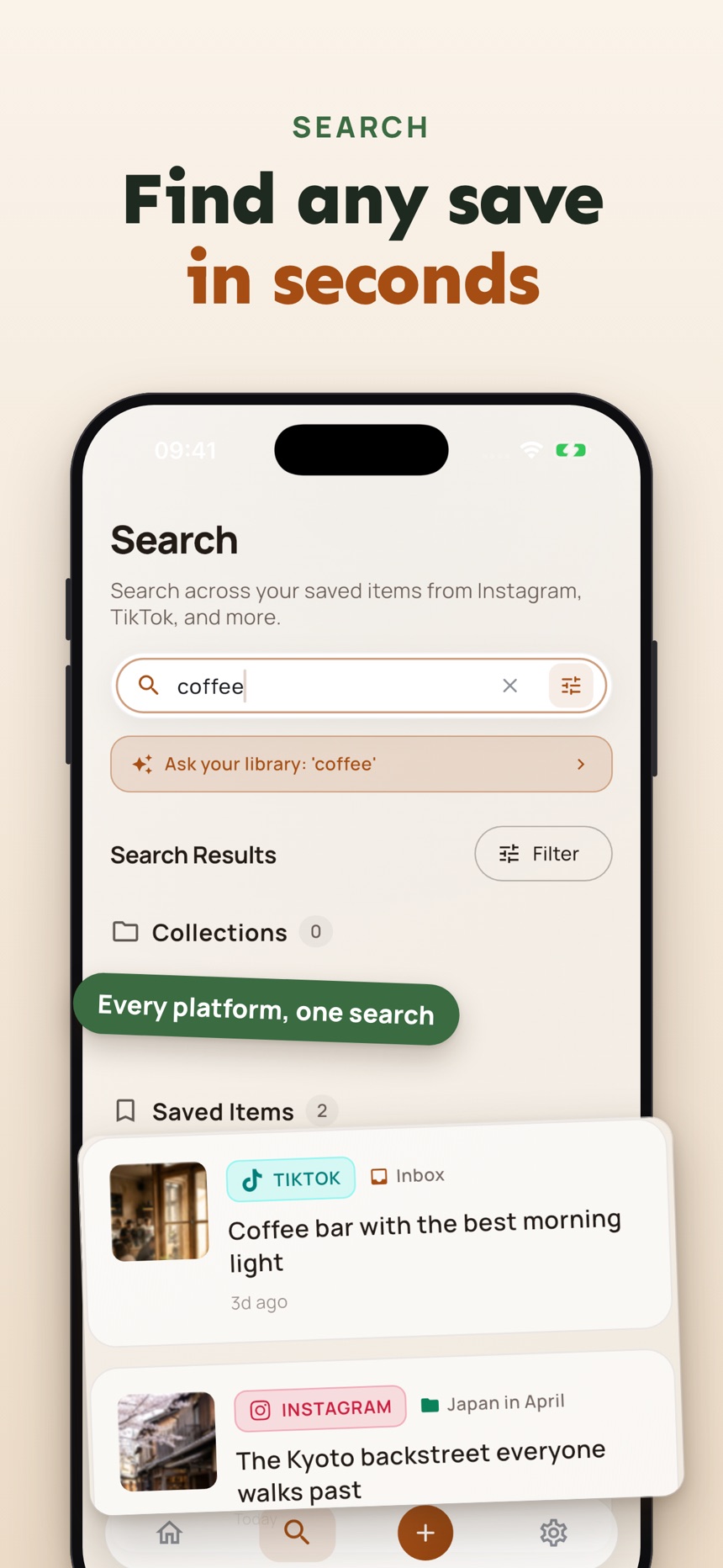
- Save from any app with the iOS share sheet, or save a screenshot or photo.
- Search across everything you saved, with collections and tags from what each post says.
- A Private Vault locked with Face ID or Touch ID.
Frequently asked questions
What is a bookmark links app?
It is a phone app that saves links from your browser and other apps in one place, so you can sort them lightly and find them again later. It replaces scattered tabs, screenshots and messages to yourself.
How many categories should a bookmark app have?
Four to eight is plenty for most people. Start with action-based ones such as Read Later, Things to Buy, Places to Go and Ideas to Try, and split a category only when it gets crowded.
Is a bookmark app better than browser bookmarks?
It is often better if most of your saves come from social apps on your phone, because it works from the share menu in every app. If browser bookmarks already work for you, keep using them.
How do I stop saved links from piling up?
Give temporary links an exit plan and do a short review during natural pauses in your week. Delete what no longer matters and open one or two links you meant to use.
Can a bookmark app save links from social media apps?
Many bookmark apps accept links from any app through your phone’s share menu, including Instagram, TikTok and YouTube posts. Check that the app you choose appears in the share sheet of the apps you use most.
Should I delete links after I use them?
Yes, for temporary links such as a sale, a registration page or a menu for one reservation. Delete them after use or keep them in a short-term collection, so the links you keep stay worth searching.