
Your phone was supposed to make small tasks easier. Instead, opening it to write a grocery item, check a routine, or save one useful page can lead to badges, feeds, settings, and a dozen unrelated choices. The real problem is not that you need more productivity software. It is that too many apps ask for your attention before they help you finish the one thing you came to do.
Quick answer: The best minimalist phone apps do one everyday job clearly, open quickly, and stay out of the way once that job is done. Pick them by job, not by looks: quick notes, a short to-do list, a timer, a habit check-in, a family routine log, a link saver, a calm reader, and a few more covered below. Focused tools usually beat all-in-one systems.
Disclosure: Digital Traffic Labs makes SocialMarks. We mention it where it fits and explain our criteria, so you can judge every option for yourself.
What is a minimalist phone app?
A minimalist phone app is a tool built around a small, clear purpose with only the features needed to complete it comfortably. It reduces decisions on the screen so you can act, check the result, and move on.
Minimalism does not mean an app must look plain or offer no options. A good app can still be thoughtful, attractive, and flexible. The difference is that its main action remains obvious, even when you are tired, rushing out the door, or holding a baby with one hand.
What makes an app feel minimal?
The best test is not the number of buttons. It is whether you know what to do within a few seconds of opening the app. A clear home screen, sensible defaults, readable type, and quick entry matter more than a sparse color palette.
Look for an app that lets you add information without building a system first. If a simple note requires choosing a workspace, template, tag structure, sharing rule, and view, it may be powerful, but it is not minimalist for that moment. A focused tool lets you finish a small job before distraction takes over.
A minimal app should also respect the end of the interaction. After you check off a reminder or log an event, it should not push you toward a feed, achievement screen, social prompt, or a new setup task. The quietest feature is often the one that does not demand a return visit.
Use this quick checklist before you install anything:
- You can do the main action within a few seconds of opening the app.
- Adding something does not require setting up a system first.
- The app does not push a feed, streak or social prompt after you finish.
- You can find what you entered later without remembering where you filed it.
Which jobs do the best minimalist phone apps solve?
Rather than collecting apps because they look clean in screenshots, start with the jobs your phone already handles badly. These are the twelve areas where a focused app can make a visible difference in a day.
Here are the twelve jobs at a glance, grouped where they overlap.
| Job | What a focused app should do |
|---|---|
| Quick notes and to-dos | Open to a blank note or a short list of what is next |
| Focus timers and habits | Start and stop easily; one simple daily check-in |
| Family routine logs | Log a feed, nap or diaper fast, charts second |
| Saved links and reading | Save pages quickly; read them without a feed |
| Photo cleanup and scanning | Turn receipts and forms into useful records |
| Calendar | Open on today; add an event in one step |
| Recipes and places | Turn videos into steps; show saved places on one map |
| Spending log | Record a purchase in seconds; see a simple total |
1. Quick capture for notes you cannot lose
A good capture app opens to a blank note or a prominent add button. It is useful for a parking location, a phrase you want to remember, a grocery item, or the question you need to ask later. Search and basic organization are helpful, but they should support capture rather than slow it down.
For people who write long research notes, collaborate with coworkers, or manage complex projects, a larger notes platform may be genuinely better. For everyday memory support, though, the simpler choice often wins because you actually use it when the thought appears.
2. A short, honest to-do list
Minimal task apps work best when they answer one question: what is next? They should make it easy to add a task in natural language, set a reminder when needed, and see a short list without turning every errand into a project plan.
Be careful with complicated productivity methods if your needs are mostly household tasks. Labels, recurring schedules, filters, and priority systems can help people managing a team or a detailed work calendar. They can also create more maintenance than the task itself deserves.
3. Focus timers that create a finish line
A timer is one of the simplest ways to put a boundary around a task. Whether you are clearing email, folding laundry, studying, or doing a quick cleanup before bedtime, a focused timer turns an open-ended obligation into a manageable block of effort.
The most useful versions make starting and stopping effortless. Detailed analytics and leaderboards may motivate some users, but they are not necessary for a timer to work. If checking your focus streak becomes another thing to manage, the app has drifted away from its job.
4. Habit tracking without guilt
A minimalist habit tracker should make one daily check-in feel easy. It can help with a walk, reading, stretching, watering plants, or any small practice you want to notice consistently. The goal is a clear record, not a colorful dashboard that makes one missed day feel like failure.
A simple yes-or-no log is often enough for a single habit, while a more detailed app can be better if you enjoy reviewing patterns over time. The key is to avoid tracking so many goals that the tracker becomes its own daily chore.
5. Family routine logs at the moment they matter
Parents often need to record an event quickly, then return to caring for their child. A focused routine log can reduce the mental load of remembering the last feeding, diaper change, nap, or other day-to-day detail. The best design puts fast logging ahead of charts and customization. Our own baby tracker, FeedRight, is built around that idea: one tap to log a feed, sleep or diaper, and a glance at how long ago the baby last ate.
Different families need different levels of detail. A shared tool may be a better fit when multiple caregivers need to see the same information, while a basic personal log can be enough for one caregiver. For questions about a baby’s health, feeding, or sleep, use the log as a record to discuss with your pediatrician rather than as medical guidance.
6. A link saver for pages you want to find again
Browser tabs are a poor long-term memory system. A dedicated place for saved links is useful when you find a recipe, local service, article, gift idea, video, or reference page and want it later without leaving fifty tabs open. Our guide to the best app to save links explains what to look for.
Minimal bookmark tools should make saving almost automatic and finding items later pleasantly boring. Simple collections or a handful of labels are usually enough. A research database is better for academic work or large shared libraries, but it can be excessive when all you need is a reliable personal shortlist. A mobile link saver covers most everyday cases.
7. A reading space that removes the feed
Reading apps can be minimalist even when the content is not. The essential question is whether the app gives you a calm place to read saved articles, books, or documents without a constantly refreshing stream of recommendations.
8. Simple photo cleanup and scanning
Your camera roll holds receipts, forms, whiteboards, screenshots, and photos you mean to send later. A focused scanner or cleanup tool can turn those loose items into useful records without asking you to adopt a full document-management workflow.
9. A calendar view that shows today first
A minimal calendar opens on what is happening today and makes adding an event a single quick step. You should not need to scroll through weeks of color-coded blocks to see whether pickup is at three or four. If shared family calendars are your main need, choose the one everyone in the house will actually check.
10. Recipes saved from videos, ready to cook
Many dinner ideas now arrive as short videos, not recipe pages. A focused recipe tool should turn that video into ingredients and steps you can follow with messy hands, instead of making you replay it. Our guide on how to save recipe links without losing dinner covers a simple system for this.
11. One map for places you want to visit
Restaurants, playgrounds and weekend spots tend to scatter across saved posts and messages. A single map of places you saved is often more useful than a long list, because you can see what is nearby when you are already out.
12. A spending log you will actually open
A minimal budget or expense app lets you record a purchase in seconds and see a simple total for the week or month. Detailed categories and forecasts help some households, but for many people a quick, honest log is what keeps the habit going.
How do you choose without creating new clutter?
Before downloading anything, describe the problem in one sentence. For example: “I need to remember household tasks without opening my work system,” or “I need a faster place for links than browser tabs.” If you cannot state the job simply, try solving the problem with the tools already on your phone first.
Then give an app a small trial based on a real routine. Use it for a few ordinary days, not during a burst of motivation. Notice whether you hesitate before opening it, whether it helps at the right moment, and whether you can find what you entered later.
Also consider what you are willing to maintain. A minimalist app with a little setup can be worthwhile if that setup saves time every week. But if the app requires frequent sorting, configuration, or checking just to stay useful, it may be adding digital housekeeping to an already full day. The same rule works for saved links, as our post on a bookmark links app that stays useful explains.
Where our apps fit
At Digital Traffic Labs we build small apps around a single job, so a few of the jobs above are ones we work on ourselves.
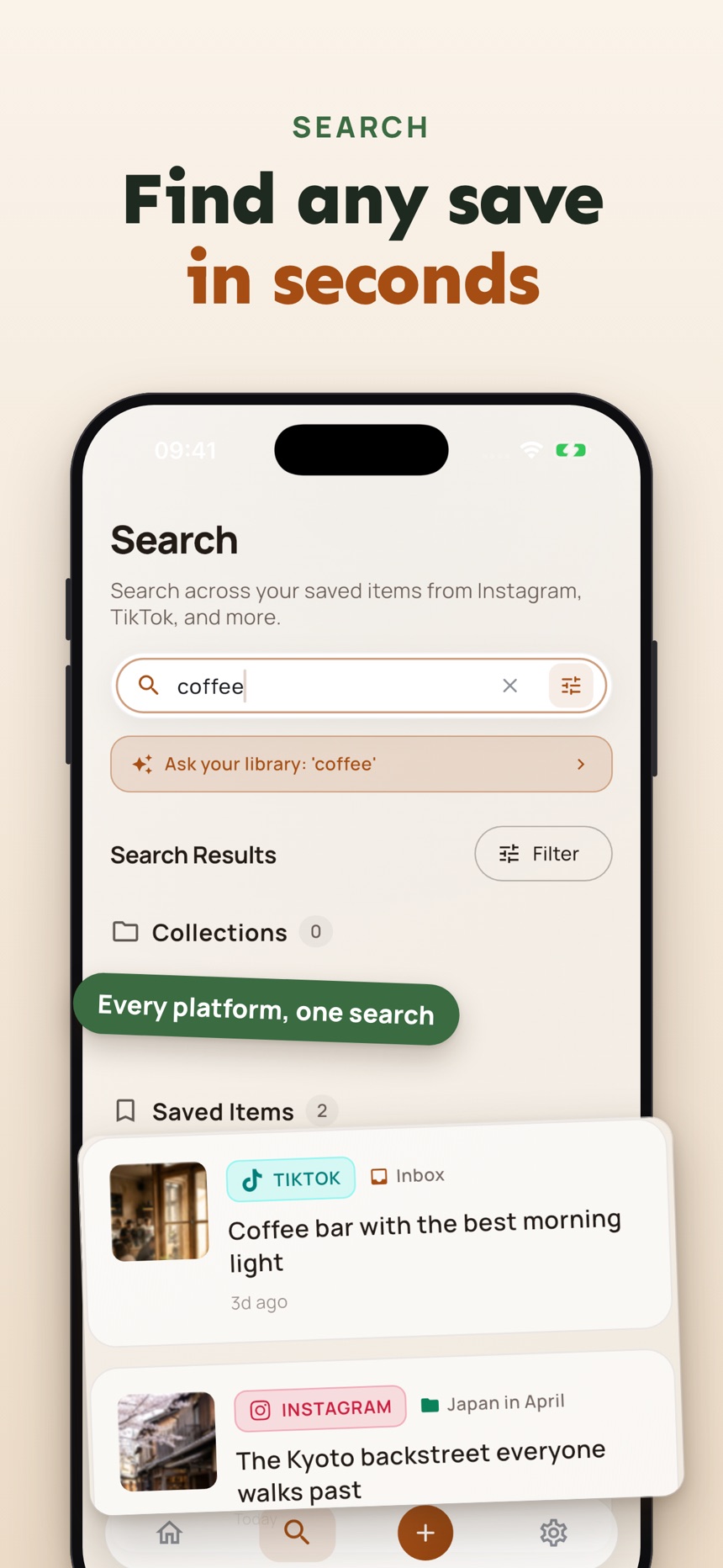
- SocialMarks (iPhone) saves posts and links from Instagram, TikTok, YouTube and the web and reads them for you (after you agree): recipes with Cook Mode and a shopping list, places pinned on a map, and search across everything you saved. It is free to use with no ads. See the SocialMarks page or the App Store.
- FeedRight (iPhone, Apple Watch and Android) logs feeds, sleep and diapers in one tap, shows which side you finished on, and estimates when the next nap is due. The free version works offline with no account and shows banner ads; Premium is optional. See the FeedRight page, the App Store or Google Play.
The best tool is the one that leaves your phone a little quieter after you use it.
Frequently asked questions
Are minimalist phone apps less capable?
Not necessarily. They are intentionally narrower, which can make them better for a single repeated job. Broader apps are often more capable for complex projects, shared work, and detailed customization, but that extra capability is not always helpful for a quick personal task.
How many minimalist apps should I keep?
Keep only the apps that earn a place in your routine. One for fast notes, one for tasks, and one for a specific recurring need may be plenty. If two apps solve the same problem, use the one you open without thinking.
Can a minimal app work for family routines?
Yes, provided its logging flow matches what you need to remember and, when relevant, what other caregivers need to see. A quick routine record can reduce mental load, while medical questions should still go to your pediatrician.
How do I make my phone feel more minimal without new apps?
Start by removing apps you have not opened in a month, turning off notifications that do not need you right away, and keeping only daily tools on your first Home Screen. Then add a focused app only for a job your phone still handles badly.
How do I choose a minimalist phone app?
Describe the job in one sentence, then try the app for a few ordinary days. Keep it if you can do the main action within seconds, add things without setting up a system, and find them again later.
Can minimalist apps reduce screen time?
They can, because a focused app lets you finish a task and close it without feeds, streaks or social prompts pulling you back. Turning off notifications that do not need you right away helps just as much.