
You find a job posting that looks perfect. You think “I’ll come back to this later” and move on. Three days later, you cannot find it. It expired. Or you simply cannot remember which of the thirty open tabs it was in.
This happens to almost everyone who is actively job searching. The search itself is not the hard part. The hard part is keeping everything organized well enough to actually follow through. If you want to keep track of job listings without losing your mind, the problem is not that you are forgetful. It is that you have no system.
Quick answer: To keep track of job listings you find online, save every posting to one dedicated place, add a one-line note about why it fits, and sort each one into a simple stage: To Apply, Applied, or Not a Fit. Review the list a few times a week during a set job search session, so good roles do not expire before you act.
Why is it so hard to keep track of job listings?
The link-saving trap
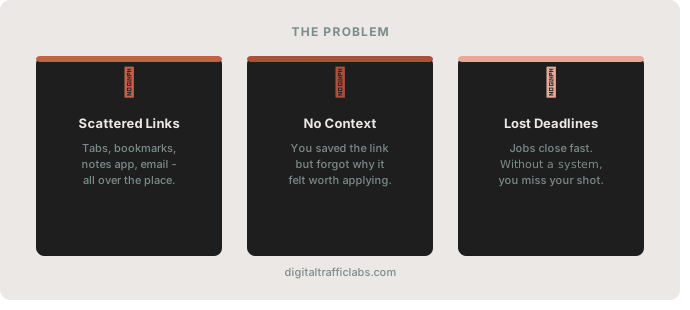
The easiest thing in the world is saving a link. You can bookmark it, copy it into a note, share it to yourself on Slack, email it to yourself, or just leave the tab open. All of these feel like action. None of them is a real system.
Saving a link and organizing that link are two completely different things. When you save a job posting in five different places, you do not have five backups. You have five sources of confusion, and deciding where to look becomes its own exhausting task. Eventually you stop going back at all.
No context, no memory
When you come back to a saved job link a week later, can you remember why it felt interesting? Was it the salary? The location? A specific line in the job description that matched what you were looking for?
Links without notes are just URLs. What you actually need is a saved link that carries context, something that reminds you why you flagged it in the first place. This matters even more when you are applying to multiple roles across different companies. Without notes or labels, everything starts to blur together.
Job listings disappear fast
Unlike articles or recipe links, job postings often have a short shelf life. Many close within a week or two, and some are taken down as soon as the role is filled. If your system is to come back later and hope the link still works, you are going to miss good opportunities. That urgency is why job link saving should be intentional, not a casual “I’ll deal with this later.”
How do you keep track of job listings properly?
Start with a dedicated place for job links
The first step is simple: stop saving job links in the same place where you save everything else. Your general browser bookmarks, your notes app, your phone’s browser history: these are not job search tools. They are general-purpose clutter collectors.
Pick one dedicated place to save job listing links. It does not matter what it is (a folder, an app, a specific bookmark category) as long as it is separate from everything else and you use it consistently. If you mostly find roles on your phone, the share-first habit in how to save links while browsing on your phone makes this almost automatic.
Add a short note to every link you save
When you save a job listing, take 10 seconds to add a note. Even one sentence: “Good salary range, remote, requires 3 years experience.” That is enough to bring the context back when you return to it later.
This habit is the difference between a list of 20 URL strings and a list of 20 jobs you can actually evaluate and compare. When everything has a short label or note attached, reviewing your saved listings becomes fast and actionable instead of confusing.
Create simple categories
You do not need a complex system. Three or four categories are enough, and you always know what stage each listing is at. You are not re-reading listings you already decided against, and you are not losing track of places you already sent a resume to.
| Category | What goes here | What to note |
|---|---|---|
| To Apply | Roles you want to apply to soon | Why it fits and any closing date you can see |
| Applied | Roles you sent an application to | Date applied and who you contacted |
| Not a Fit | Roles you decided against | One reason, so you do not reconsider it later |
| Closed, Still Interested | Roles that closed but appeal to you | Company name and job title to search again |
For more ideas on naming and grouping saved links, see how to organize saved links without clutter.
What should you do when a job posting disappears?
Sometimes you click a saved link and the job is gone. This is frustrating, but there are a few things worth doing before giving up.
Copy the job title and company name and search for it directly. Some companies repost the same role or list it on several job boards. It is also worth checking the company’s own careers page, since some smaller companies only post there. To keep the details of a posting even after the page goes down, our guide on how to archive web links without losing them has a few simple options.
If the position is truly closed, do not delete it right away. Move it to a “Closed, Still Interested” folder. Companies repost roles, and a brief, well-timed note to the hiring manager a few months later can be worth sending.
How do you build a job search habit that sticks?
Searching for jobs works best when it has a rhythm. A loose daily check of job boards is rarely effective. What works better is setting a specific time, even 20 or 30 minutes, a few times a week, where you both search and organize.
During that time, go through your saved job listings. Apply to the ones in “To Apply.” Move the ones you’ve sent resumes for to “Applied.” Clean out anything you are no longer interested in. That short cycle is what keeps the system working over weeks of searching, not just the first few days. The same idea, keeping saves useful instead of just stored, is the heart of link organization that keeps saves useful.
How SocialMarks helps
If you find most job listings on your phone, SocialMarks gives them one organized place to land. It is our iPhone app for saving links and posts from any app through the share sheet, including LinkedIn and any job board on the web. It is not a job search platform and it does not track applications, but it solves the “I saved it somewhere” part. It is free to use, with no ads and no account needed.
- Collections for each stage, like To Apply and Applied.
- One search across every listing you saved.
- A dead link check that shows which saved postings no longer open.
Get SocialMarks on the App Store and send it the next listing you find.
Frequently asked questions
What is the best way to keep track of job listings?
Save every posting to one dedicated place, add a short note about why it fits, and sort it into a stage like To Apply, Applied or Not a Fit. Review the list a few times a week.
How do I save a job posting before it expires?
Save the link as soon as you find it and note the job title, company and any closing date. If you want the details after the posting is removed, keep a copy of the description or a screenshot.
What should I do if a saved job link no longer works?
Search for the job title and company name, and check the company’s own careers page. If the role is closed, move it to a Closed, Still Interested folder in case it is posted again.
How often should I review saved job listings?
A focused 20 to 30 minute session a few times a week works well. Apply to what is waiting, update the stages, and clear out roles you are no longer interested in.
Should I use a spreadsheet to track job applications?
A spreadsheet works well once you apply, with columns for company, role, date applied and next step. For saving postings while you browse, one link app or bookmark folder is faster, and you can copy the roles you apply to into the spreadsheet.
Can SocialMarks track job applications?
No. SocialMarks is not a job search platform and does not track applications, but it saves job listings from LinkedIn and any job board through the iPhone share sheet into collections such as To Apply and Applied.