
You open a travel blog, spot a perfect café recommendation, and think “I’ll find this later.” Then you land, open your phone, and it’s gone. The tab closed. The browser history is buried. The link is just gone.
This happens to almost every traveler. Not because they’re disorganized, but because saving things on the go is genuinely awkward. You’re switching between maps, translation apps, and Instagram, and there’s no obvious place to stash a link you found two days ago. The good news: you don’t need a new system from scratch. You need a small habit shift and the right tool in your pocket.
Quick answer: To save links while traveling, pick one app for every travel link, create two or three simple folders like Eat, See and Stay before you leave, and save anything worth keeping the moment you see it. Sort and label later at the hotel. One place and one-tap saving is what makes those recommendations actually make it into your trip.
Most people assume the problem is memory. It’s not. Travel creates a dozen different contexts (planning, exploring, eating, shopping) and links get dropped between all of them.
Why is it hard to save links while traveling?
Tabs get closed, bookmarks get lost
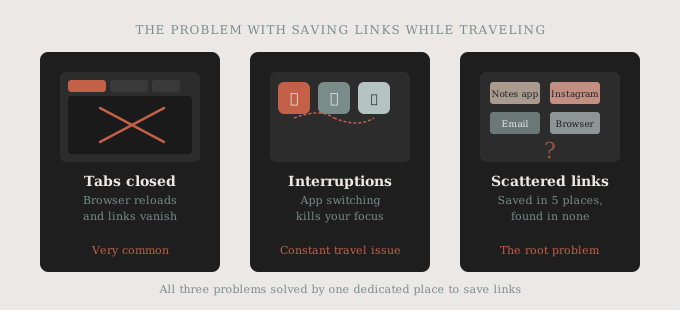
You’re on your phone, researching a neighborhood. You open six tabs, get a notification, and by the time you look back, the browser has reloaded everything. Gone.
Browser bookmarks aren’t much better. Finding a bookmark you saved three days ago, in the middle of a busy street, is its own frustration. Most people give up and just search for it again. Phones are simply not set up for temporary research storage by default.
Context switching kills your focus
You find a great restaurant link on Instagram. Then someone messages you. Then you check the map. By the time you’re back to that restaurant link, you’ve forgotten where you saw it. Our guide on how to save Instagram links easily helps with exactly that moment.
Travel naturally creates constant interruptions. Every new city, every new situation pulls your attention in a different direction. A link-saving system that only works when you’re sitting still at a desk will never survive a travel day.
Too many apps, no one place
Some people use notes apps. Some save to Instagram collections. Some email links to themselves. The result is that your saved content is scattered across five different places and you can never find anything when you actually need it. A single, reliable place to save links while traveling changes everything.
How do you save links while traveling and actually find them?
Save first, organize later
The biggest mistake is trying to organize in the moment. You’re standing on a street corner: just save the link and move on. You can add labels and sort things out when you’re back at the hotel.
The key habit: the moment you see something worth keeping, save it immediately. Don’t count on coming back to it. The one-tap save is the whole system. For the basics of saving from any app, see how to save links while browsing on your phone.
Use one app for everything
When you commit to one place for all your saved links, finding things becomes obvious. No more checking notes, email, and Instagram collections. One search, one result.
This is especially useful for trips where you’re saving restaurant links, museum booking pages, transport schedules, and hotel addresses all at once. Having them in one app, searchable and organized by folder if you want, means you can save links while traveling without the chaos.
Create simple folders before you go
Before a trip, create two or three folders: “Eat,” “See,” “Stay.” That’s it. When you save a link on the go, you drop it into one of those. Five seconds, done.
You don’t need a complex system. You need a system that works when you’re tired, jet-lagged, and standing in a busy train station.
What travel links are worth saving, and what can you skip?
Not every link is worth keeping. A good rule: if you’d be annoyed to lose it, save it. If it’s just casual browsing, let it go.
Worth saving: restaurant reservations, museum pages with booking info, neighborhood guides you want to read properly, transport timetables, accommodation confirmation pages, and any “best of” list you’re actually planning to use.
Not worth saving: random articles you’ll never read again, social posts you already liked, anything you can look up in two seconds.
A quick save-or-skip list:
| Link | Save or skip |
|---|---|
| Restaurant reservations | Save |
| Museum pages with booking info | Save |
| Neighborhood guides to read properly | Save |
| Transport timetables | Save |
| Accommodation confirmation pages | Save |
| Random articles you will not reread | Skip |
| Social posts you already liked | Skip |
| Anything you can look up in seconds | Skip |
How do you build the habit before you leave?
The best time to practice saving links for a trip is before it starts. A simple pre-trip routine:
- Create a folder or collection for your destination, with Eat, See and Stay inside it if you like.
- Put your link app in the first row of your phone’s share sheet.
- Save every recommendation you find during planning into that folder.
- The night before you leave, delete what no longer appeals and open the few bookings you will need on day one.
By the time you land, you already have a base of saved content, and the habit of using the app is already set. Build the save-first reflex at home, and it will follow you on the road. If you need help setting up the app side, see 5 simple ways to save links on iPhone, and when you get home, our guide to organizing bookmarks on your phone helps you keep the best finds for next time.
How SocialMarks helps
Travel is where SocialMarks, our iPhone app for saving posts and links, does some of its most useful work. Save a restaurant reel, a TikTok city guide or a blog post through the share sheet, and SocialMarks reads it (only after you agree) and pins every place it mentions on a map. Planning a trip with it costs nothing: it is free to use, with no ads and no sign-up.
- Every place from your saves on one map, with route planning.
- Open any place in your maps app, and turn on optional nearby reminders.
- Collections per trip and one search across everything; your location stays on your phone.
Download SocialMarks on the App Store before your next trip.
Frequently asked questions
What is the best way to save travel recommendations on my phone?
Send every recommendation to one app through the share button and drop it into a simple folder like Eat, See or Stay. Keeping everything in one place means one search finds it on the road.
How do I save places from Instagram or TikTok for a trip?
Use the share or copy link option on the post and save it to your travel folder. SocialMarks can read a saved post and pin the places it mentions on a map.
Should I organize travel links before or during the trip?
Set up a few folders before you go, then save first and sort later during the trip. Organizing on a busy street is where links get lost.
Which travel links are worth saving?
Save anything you would be annoyed to lose: bookings, museum pages, transport timetables, neighborhood guides and lists you plan to use. Skip anything you can look up again in seconds.
Can I open saved travel links without internet?
A saved link still needs an internet connection to open, so for bookings, tickets and addresses you need without signal, also keep a screenshot or a downloaded confirmation. Store those copies in the same trip folder as the links.
How do I share saved travel links with a travel partner?
Agree on one shared place before the trip, such as a shared note or a shared collection in a link app, and send each link there instead of scattering links across a chat thread. Sorting them into Eat, See and Stay lets both of you find a place quickly.