
You’re watching a YouTube video about lighting setups. Halfway through, the creator mentions a tool you want to check out later. So you save the link in your browser, your notes app, maybe a DM to yourself on Instagram.
Two weeks later, you have no idea where it went.
If you’re a content creator, this is one of those small problems that quietly costs you time every week. You’re always consuming: articles, tools, tutorials, competitor posts, design inspiration, brand guidelines, affiliate programs. The volume is high and it comes from everywhere. The problem isn’t a lack of discipline. It’s a lack of a system that fits how creators actually work.
Quick answer: The best way to organize your saved links as a content creator is to send every link to one dedicated app and sort it into a handful of categories that match how you work, such as Tools, References, Inspiration, Brand stuff and Ideas. Add a one-line note to inspiration links and do a five-minute sweep each week.
What is link organization for content creators?
Link organization for content creators is a system for saving and retrieving links from many platforms (YouTube, Instagram, TikTok, newsletters, tools) in one searchable place, sorted by how you actually use them rather than where you found them.
Why do content creators struggle to organize saved links?
You consume across too many platforms
A typical creator might save links from X, YouTube, newsletters, Reddit threads, Notion docs, and browser tabs, all in the same afternoon. Each platform has its own “save” mechanic, and none of them talk to each other. Your saved posts on Instagram stay on Instagram. Your browser bookmarks stay in your browser. Nothing is in one place. We cover the Instagram side in how to save Instagram links easily without the mess.
Research and inspiration get mixed together
Creators need two different types of links: reference material (tools, tutorials, how-tos) and inspiration (design ideas, content formats, competitor examples). When both end up in the same unsorted pile, finding the right one at the right moment becomes harder than it should be.
The tab problem
A lot of creators keep important links open in browser tabs rather than saving them properly. It works until it doesn’t: a crash, a restart, or just too many tabs, and the whole system collapses. Tabs are not a filing system.
How do you organize your saved links as a content creator?
The goal isn’t a perfect organization setup. It’s a lightweight system you’ll actually maintain between shoots, edits, and posting schedules.
One place for everything
Pick one app and save everything there. It doesn’t matter which one; what matters is consistency. When everything goes to the same place, “where did I save that?” stops being a question. Unlike spreading links across browser bookmarks, Instagram saves, and WhatsApp messages to yourself, a single link app gives you everything in one searchable place, regardless of where you originally found it.
Use categories that match how you work
Generic folder names like “Resources” get messy fast. Instead, think about how you actually use links:
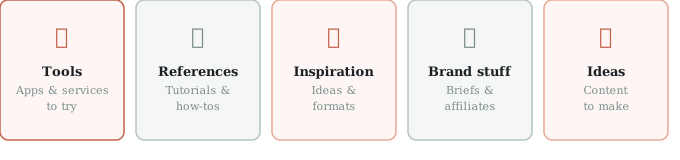
- Tools: apps, software, and services you want to try or already use
- References: tutorials, how-tos, and articles you’ll come back to
- Inspiration: content formats, design ideas, and accounts worth watching
- Brand stuff: briefs, mood boards, affiliate links, and sponsor materials
- Ideas: links that sparked a content idea you haven’t made yet
Five categories. Everything fits somewhere, and you can find it fast. For more on choosing names that last, see how to organize saved links without clutter.
Tag by project or platform
If you work on multiple channels or with multiple clients, add a secondary tag: YouTube, Instagram, Client A, Q3 Campaign. Cross-tagging lets you pull up everything related to a specific project without reorganizing your whole library.
Do a weekly sweep
Once a week, spend five minutes going through recent saves. Act on what’s actionable, delete what’s stale, and move anything that’s just sitting there. This keeps the library clean without constant maintenance. The idea that saves should stay useful, not just stored, is the core of link organization that keeps saves useful.
What should you do with inspiration links?
Inspiration is the category content creators most often let pile up. You save something because it sparked an idea, then never open it again. Two things help:
- When you save an inspiration link, add a one-line note about why you saved it: “format idea for tutorial series” or “lighting reference for outdoor shoots.” That note is the difference between a link you’ll use and one you’ll scroll past in three months.
- Create a separate “To make” category for links directly tied to content you’re planning. When you sit down to plan your next batch of content, that list is already waiting for you.
Video references deserve their own home too; our guide to saving links to watch later shows a simple watch vs. read split.
What habit makes it all work?
Tools only work if the habit sticks. For creators, the easiest way to build the habit is to attach it to something you already do.
Save links right when you find them, not “later.” If you’re watching something and a resource comes up, save it before the next video autoplays. If you’re reading a newsletter and something catches your eye, save it before you close the tab. The two-second save now beats the ten-minute search later.
If you also browse on mobile, the same principles apply on the go. We cover the mobile side in 5 simple ways to save links while browsing on your phone.
The whole system at a glance:
| Habit | How it works |
|---|---|
| One place for everything | Every link goes to the same app |
| Categories by use | Tools, References, Inspiration, Brand stuff, Ideas |
| Tags for projects | Add a platform, client or campaign tag |
| Note on inspiration links | One line on why you saved it |
| A To make list | Links tied to content you are planning |
| Weekly sweep | Five minutes to act, delete or move |
| Save right away | Before the next video autoplays |
How SocialMarks helps
If most of your saving happens on your phone, SocialMarks is the iPhone app we built for it. It saves posts and links from Instagram, TikTok, YouTube, Pinterest, X, Threads, Reddit, Medium and any web link through the share sheet, and reads them for you (only after you agree), with tags based on what the post actually says. You can start free: no ads, and no account to set up.
- Collections for Tools, References, Inspiration and Ideas, plus one search across everything.
- Share a collection as a public web page, handy for a resource list or a brief.
- Optional SocialMarks Pro adds Ask Your Library: ask a question and get an answer from your own saves.
SocialMarks is on the App Store for iPhone and iPad.
Frequently asked questions
How do content creators organize their saved links?
A simple setup works best: one dedicated app with a few broad categories such as Tools, References, Inspiration and Ideas. Saving everything in one place means you can find links again when you need them.
What is the best way to save links as a content creator?
Save links the moment you find them, using one app that accepts links from every platform. On a phone, use the share sheet, then drop the link into a category before you move on.
How do I stop losing links I find while browsing?
Pick one app as your single destination and make it the first option when you hit Share. The two-second habit of saving immediately prevents links from getting lost.
Should I use folders or tags for saved links?
Use a few broad folders for how you use links, and add tags for projects, clients or platforms. Folders keep the library simple, and tags let you pull up everything for one project.
Where do I find my saved links?
It depends on where you saved them: Instagram saves live in Instagram’s Saved section, browser bookmarks and reading lists live in the browser, and links shared to another app stay inside that app. Sending every link to one app means you only ever have to look in one place.
How do creators save inspiration links so they actually use them?
Add a one-line note about why you saved each inspiration link, such as a format idea or a lighting reference, and keep a separate To make list for links tied to content you are planning. That note is what turns a saved link into something you use.